Marketplace Settings
The minimum setup to send offers should have been completed when the API credentials were entered under marketplace settings. You should have the ability to create and update offers.
This leaves the other marketplace settings which you would want to configure. I have listed the important configs to setup at the top of this guide. The Guide is referencing the section under Administration > Multi-Channel > Marketplace Settings.
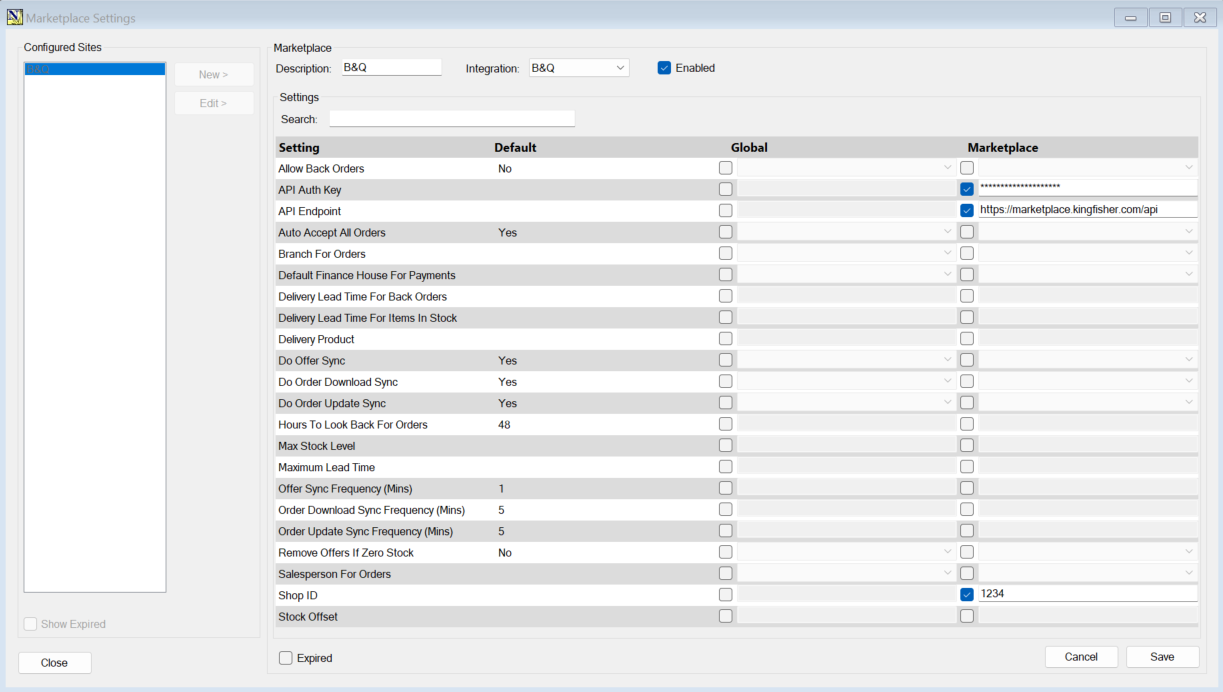
Important settings
| Marketplace Config | Summary |
Example Input (---Do not copy these 1 for 1---) |
| Allow Back Orders | The ability to list product without them being in stock. However, you need to have either Purchase Orders with expected due dates or Supplier Stock Availability for this to work. | Yes |
| Branch For Orders | Which branch to set Web orders against by default | Head Office |
| Default Finance House | Which finance house should be used for Web order payments from the Marketplace | B&Q Finance House |
| Salesperson For Orders | The Salesperson Web orders get set against | B&Q |
| Offer Sync Frequency (Mins) | How often ServerGUI checks for offer updates in minutes | 5 |
| Order Download Sync Frequency (Mins) | How often ServerGUI checks for new orders in minutes | 5 |
| Order Update Sync Frequency (Mins) | How often ServerGUI checks for order updates in minutes |
5 |
| Do Offer Sync | Should ServerGUI update offers |
Yes |
| Do Order Download Sync | Should ServerGUI download Orders |
Yes |
| Do Order Update Sync | Should ServerGUI send Order Status Updates to Marketplace |
Yes |
| Delivery Product | If the NCompass pulls down an alternate form of shipping/delivery under the Web order, this is the delivery product it will use by default. |
|
Other Settings
| Marketplace Config | Summary |
Example Input (---Do not copy these 1 for 1---) |
| Auto Accept All Orders |
A config dedicated to evolution, you need to "Accept" orders from their site before you receive payment.
Not working currently |
Yes |
| Delivery Lead Time For Back Orders | The lead time for delivery on items which are on Back Order | 5 |
| Delivery Lead Time For Items In Stock | The lead time for delivery on items in stock | 0 |
| Hours To Look Back For Orders | How far back to look for new Orders | 48 |
|
Max Stock Level |
What is the highest stock amount you will send to the marketplace. | --Leave Unset-- |
| Maximum Lead Time | If you have items on backorder, what is the maximum lead time you will offer for any product. It will not offer items above this set lead time | 10 |
| Remove Offers If Zero Stock | Whether ServerGUI should send offer delete requests when you have 0 stock in the system for an item. | No |
| Stock Offset | How much to offset stock by when sending offer updates | 0 |
This guide is made on 05/09/2025 the integration may be subject to change and there may be more settings after this date.