Creating Marketplace Offers
Creating marketplace offers is done under the Web/Online Details tab of a product, managed next to all other web sections.
Product Enquiry > Search for a product > Right click product > Select Web/Online Details > Navigate to Marketplace Tab
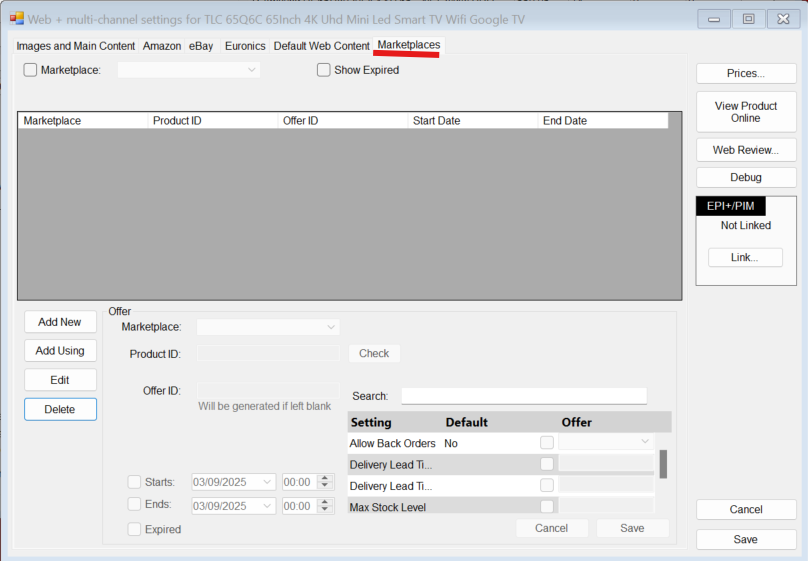
After reaching this tab, to create an offer you just need to press "Add New"
Select the marketplace of your choosing.
If B&Q is selected it will auto populate the Product ID using EAN - You can press "Check" to see if this is a B&Q catalogue product (This checks with B&Q to see if its an available product in the existing catalogue)
You can then enter a pre-existing offer ID to link an active B&Q offer or leave it blank and NCompass will create a new one
NCompass does not auto-link offers, they either need to be created or manually linked by entering offer ID
B&Q Marketplace links all products using EAN
You can then press Save to create the offer -
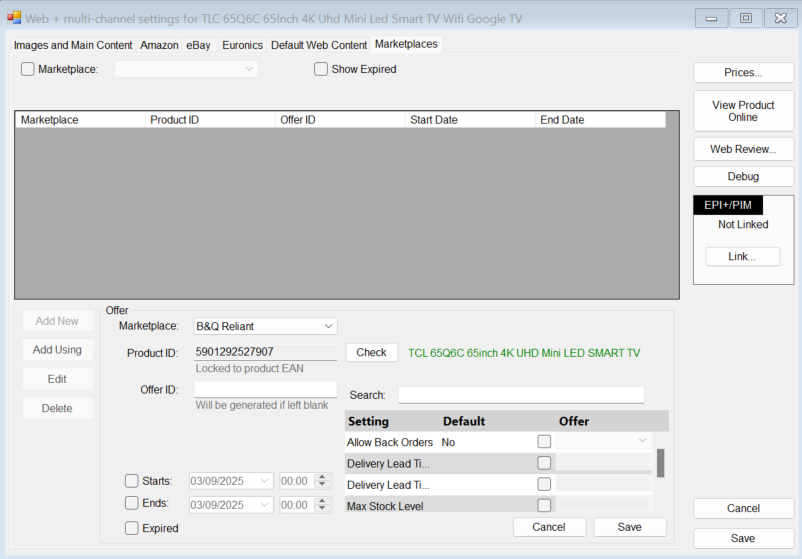
The offer settings in the bottom right are optional.
Notes:
You can have multiple offers for the same product for the same marketplace. (2 or more B&Q offers)