# Min/Max Energy Efficiency Class Google Feed Support

<p class="callout info">Where you might not be using our energy rating service (this would be setup for you as part of this energy rating service which is a chargeable module) you can reach out to <admin@findesolutions.com> to find out more information on this.</p>

This setup enables your Google product feed to include the following optional energy efficiency attributes, which are used to define the range of energy classes available for a product:

- **`min_energy_efficiency_class`**: Indicates the **lowest** energy efficiency class within the product range.  
    *Example*: `"min_energy_efficiency_class": "D"`
- **`max_energy_efficiency_class`**: Indicates the **highest** energy efficiency class within the product range.  
    *Example*: `"max_energy_efficiency_class": "A++"`

These values help Google display more detailed energy information for applicable products, improving compliance and visibility in search results.

#### 1. Attribute Configuration Instructions

To enable this in your system:

1. Open NCompass and navigate to**: Administration &gt;Department Management**
2. **Select** the **"All Departments"** category.
3. On the **right panel**, click on **"Web"**.
4. Scroll down to **"Define Features"**.
5. Click **"Create New"** from the central list of buttons.

#### Fill in the following fields:

- **Display Name**: `Energy Rating Group`
- **Use as filter**: *Unchecked*
- **Display Priority**: `-1`
- **Feature Type**: `Free Text`
- **Map To Web Attribute ID**: `energyrating_eprlgroup`  
      
    [![image.png](https://kb.findesolutions.com/uploads/images/gallery/2025-06/scaled-1680-/6Lzc0xkm2KuZFnwr-image.png)](https://kb.findesolutions.com/uploads/images/gallery/2025-06/6Lzc0xkm2KuZFnwr-image.png)
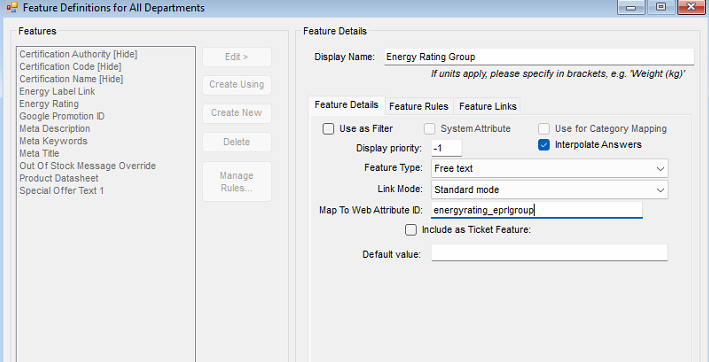
6. Click **Save**.

#### 2. Applying Energy Rating Values to Products

Once set up, assign values based on the energy class range used:

<div class="_tableContainer_16hzy_1" id="bkmrk-range-used-value-to-"><div class="_tableWrapper_16hzy_14 group flex w-fit flex-col-reverse" tabindex="-1"><table class="w-fit min-w-(--thread-content-width)" data-end="1948" data-start="1765"><thead data-end="1810" data-start="1765"><tr data-end="1810" data-start="1765"><th data-col-size="sm" data-end="1791" data-start="1765">Range Used</th><th data-col-size="sm" data-end="1810" data-start="1791">Value to Input</th></tr></thead><tbody data-end="1948" data-start="1857"><tr data-end="1902" data-start="1857"><td data-col-size="sm" data-end="1883" data-start="1857">A to G (newer scale)</td><td data-col-size="sm" data-end="1902" data-start="1883">`2019`</td></tr><tr data-end="1948" data-start="1903"><td data-col-size="sm" data-end="1929" data-start="1903">A+++ to D (older scale)</td><td data-col-size="sm" data-end="1948" data-start="1929">`2013`</td></tr></tbody></table>

<div class="sticky end-(--thread-content-margin) h-0 self-end select-none"></div></div></div>- Apply the relevant value to the **Energy Rating Group** feature for each product like so.

Under the **Product Information &gt; Web** tab for the item, locate the new feature created, and populate with the required value.

[![image.png](https://kb.findesolutions.com/uploads/images/gallery/2025-06/scaled-1680-/cB2hJjf7apheAIkC-image.png)](https://kb.findesolutions.com/uploads/images/gallery/2025-06/cB2hJjf7apheAIkC-image.png)

<span data-ogsc="black" style="border: 0px; font-style: inherit; font-variant: inherit; font-weight: inherit; font-stretch: inherit; font-size: inherit; line-height: inherit; font-family: 'Calibri Light', sans-serif; font-optical-sizing: inherit; font-size-adjust: inherit; font-kerning: inherit; font-feature-settings: inherit; font-variation-settings: inherit; margin: 0px; padding: 0px; vertical-align: baseline; color: black !important;">This will then appear in the feed like the following for use by google merchant centre, or any other agency required to use the min/max efficiency class.</span>

[![firefox_XvaHnGT6uq.png](https://kb.findesolutions.com/uploads/images/gallery/2025-06/scaled-1680-/NRxf72ZY4ywvRNks-firefox-xvahngt6uq.png)](https://kb.findesolutions.com/uploads/images/gallery/2025-06/NRxf72ZY4ywvRNks-firefox-xvahngt6uq.png)