# Google

# Google Promotions ID

This guide explains how to associate products in NCompass with the `promotion_id` attribute required for Google Merchant Center promotions. This allows you to run targeted promotions for groups of products as outlined in Google’s documentation:  
 [Google Merchant Promotions - About the promotion\_id attribute](https://support.google.com/merchants/answer/7050148?hl=en)

---

#### Step 1: Create the `promotion_id` Attribute in NCompass

To begin, you need to create a new attribute that links products to Google’s `promotion_id`.

##### Instructions:

1. **Log in to NCompass.**
2. Navigate to **Department Management**.
3. Highlight the **"All Departments"** category.
4. Click the **Web** tab.
5. Select **Define Features**.
6. In the new window, click **Create New** and enter the following details:
    
    <div class="_tableContainer_16hzy_1"><div class="_tableWrapper_16hzy_14 group flex w-fit flex-col-reverse" tabindex="-1"><table class="w-fit min-w-(--thread-content-width)" data-end="1396" data-start="963"><thead data-end="1021" data-start="963"><tr data-end="1021" data-start="963"><th data-col-size="sm" data-end="988" data-start="963">Field</th><th data-col-size="sm" data-end="1021" data-start="988">Value</th></tr></thead><tbody data-end="1396" data-start="1087"><tr data-end="1145" data-start="1087"><td data-col-size="sm" data-end="1112" data-start="1087">**Display Name**</td><td data-col-size="sm" data-end="1145" data-start="1112">Google Promotion ID \[Hide\]</td></tr><tr data-end="1207" data-start="1149"><td data-col-size="sm" data-end="1174" data-start="1149">**Use as Filter**</td><td data-col-size="sm" data-end="1207" data-start="1174">Unchecked</td></tr><tr data-end="1269" data-start="1211"><td data-col-size="sm" data-end="1236" data-start="1211">**Display Priority**</td><td data-col-size="sm" data-end="1269" data-start="1236">-1</td></tr><tr data-end="1331" data-start="1273"><td data-col-size="sm" data-end="1298" data-start="1273">**Feature Type**</td><td data-col-size="sm" data-end="1331" data-start="1298">Dropdown</td></tr><tr data-end="1396" data-start="1335"><td data-col-size="sm" data-end="1365" data-start="1335">**Map To Web Attribute ID**</td><td data-col-size="sm" data-end="1396" data-start="1365">`googlepromoid`</td></tr></tbody></table>
    
    <div class="sticky end-(--thread-content-margin) h-0 self-end select-none"><div class="absolute end-0 flex items-end"><span class="" data-state="closed"><button class="bg-token-bg-primary hover:bg-token-bg-tertiary text-token-text-secondary my-1 rounded-sm p-1 transition-opacity group-[:not(:hover):not(:focus-within)]:pointer-events-none group-[:not(:hover):not(:focus-within)]:opacity-0"><svg class="icon" fill="currentColor" height="20" viewbox="0 0 20 20" width="20" xmlns="http://www.w3.org/2000/svg"><path d="M12.668 10.667C12.668 9.95614 12.668 9.46258 12.6367 9.0791C12.6137 8.79732 12.5758 8.60761 12.5244 8.46387L12.4688 8.33399C12.3148 8.03193 12.0803 7.77885 11.793 7.60254L11.666 7.53125C11.508 7.45087 11.2963 7.39395 10.9209 7.36328C10.5374 7.33197 10.0439 7.33203 9.33301 7.33203H6.5C5.78896 7.33203 5.29563 7.33195 4.91211 7.36328C4.63016 7.38632 4.44065 7.42413 4.29688 7.47559L4.16699 7.53125C3.86488 7.68518 3.61186 7.9196 3.43555 8.20703L3.36524 8.33399C3.28478 8.49198 3.22795 8.70352 3.19727 9.0791C3.16595 9.46259 3.16504 9.95611 3.16504 10.667V13.5C3.16504 14.211 3.16593 14.7044 3.19727 15.0879C3.22797 15.4636 3.28473 15.675 3.36524 15.833L3.43555 15.959C3.61186 16.2466 3.86474 16.4807 4.16699 16.6348L4.29688 16.6914C4.44063 16.7428 4.63025 16.7797 4.91211 16.8027C5.29563 16.8341 5.78896 16.835 6.5 16.835H9.33301C10.0439 16.835 10.5374 16.8341 10.9209 16.8027C11.2965 16.772 11.508 16.7152 11.666 16.6348L11.793 16.5645C12.0804 16.3881 12.3148 16.1351 12.4688 15.833L12.5244 15.7031C12.5759 15.5594 12.6137 15.3698 12.6367 15.0879C12.6681 14.7044 12.668 14.211 12.668 13.5V10.667ZM13.998 12.665C14.4528 12.6634 14.8011 12.6602 15.0879 12.6367C15.4635 12.606 15.675 12.5492 15.833 12.4688L15.959 12.3975C16.2466 12.2211 16.4808 11.9682 16.6348 11.666L16.6914 11.5361C16.7428 11.3924 16.7797 11.2026 16.8027 10.9209C16.8341 10.5374 16.835 10.0439 16.835 9.33301V6.5C16.835 5.78896 16.8341 5.29563 16.8027 4.91211C16.7797 4.63025 16.7428 4.44063 16.6914 4.29688L16.6348 4.16699C16.4807 3.86474 16.2466 3.61186 15.959 3.43555L15.833 3.36524C15.675 3.28473 15.4636 3.22797 15.0879 3.19727C14.7044 3.16593 14.211 3.16504 13.5 3.16504H10.667C9.9561 3.16504 9.46259 3.16595 9.0791 3.19727C8.79739 3.22028 8.6076 3.2572 8.46387 3.30859L8.33399 3.36524C8.03176 3.51923 7.77886 3.75343 7.60254 4.04102L7.53125 4.16699C7.4508 4.32498 7.39397 4.53655 7.36328 4.91211C7.33985 5.19893 7.33562 5.54719 7.33399 6.00195H9.33301C10.022 6.00195 10.5791 6.00131 11.0293 6.03809C11.4873 6.07551 11.8937 6.15471 12.2705 6.34668L12.4883 6.46875C12.984 6.7728 13.3878 7.20854 13.6533 7.72949L13.7197 7.87207C13.8642 8.20859 13.9292 8.56974 13.9619 8.9707C13.9987 9.42092 13.998 9.97799 13.998 10.667V12.665ZM18.165 9.33301C18.165 10.022 18.1657 10.5791 18.1289 11.0293C18.0961 11.4302 18.0311 11.7914 17.8867 12.1279L17.8203 12.2705C17.5549 12.7914 17.1509 13.2272 16.6553 13.5313L16.4365 13.6533C16.0599 13.8452 15.6541 13.9245 15.1963 13.9619C14.8593 13.9895 14.4624 13.9935 13.9951 13.9951C13.9935 14.4624 13.9895 14.8593 13.9619 15.1963C13.9292 15.597 13.864 15.9576 13.7197 16.2939L13.6533 16.4365C13.3878 16.9576 12.9841 17.3941 12.4883 17.6982L12.2705 17.8203C11.8937 18.0123 11.4873 18.0915 11.0293 18.1289C10.5791 18.1657 10.022 18.165 9.33301 18.165H6.5C5.81091 18.165 5.25395 18.1657 4.80371 18.1289C4.40306 18.0962 4.04235 18.031 3.70606 17.8867L3.56348 17.8203C3.04244 17.5548 2.60585 17.151 2.30176 16.6553L2.17969 16.4365C1.98788 16.0599 1.90851 15.6541 1.87109 15.1963C1.83431 14.746 1.83496 14.1891 1.83496 13.5V10.667C1.83496 9.978 1.83432 9.42091 1.87109 8.9707C1.90851 8.5127 1.98772 8.10625 2.17969 7.72949L2.30176 7.51172C2.60586 7.0159 3.04236 6.6122 3.56348 6.34668L3.70606 6.28027C4.04237 6.136 4.40303 6.07083 4.80371 6.03809C5.14051 6.01057 5.53708 6.00551 6.00391 6.00391C6.00551 5.53708 6.01057 5.14051 6.03809 4.80371C6.0755 4.34588 6.15483 3.94012 6.34668 3.56348L6.46875 3.34473C6.77282 2.84912 7.20856 2.44514 7.72949 2.17969L7.87207 2.11328C8.20855 1.96886 8.56979 1.90385 8.9707 1.87109C9.42091 1.83432 9.978 1.83496 10.667 1.83496H13.5C14.1891 1.83496 14.746 1.83431 15.1963 1.87109C15.6541 1.90851 16.0599 1.98788 16.4365 2.17969L16.6553 2.30176C17.151 2.60585 17.5548 3.04244 17.8203 3.56348L17.8867 3.70606C18.031 4.04235 18.0962 4.40306 18.1289 4.80371C18.1657 5.25395 18.165 5.81091 18.165 6.5V9.33301Z"></path></svg></button></span></div></div></div></div>

> 💡 **Tip:** The `[Hide]` tag in the Display Name ensures this feature doesn’t appear on the frontend filter panel.

##### Video Walkthrough

*A short video demonstrating how to create this attribute in the Department Administration panel is available below.*

[![TeamViewer_FONHKl4UYz.gif](https://kb.findesolutions.com/uploads/images/gallery/2025-06/C6W3wZWAlZgJ6Bhm-teamviewer-fonhkl4uyz.gif)](https://kb.findesolutions.com/uploads/images/gallery/2025-06/C6W3wZWAlZgJ6Bhm-teamviewer-fonhkl4uyz.gif)

---

#### Step 2: Assign Promotion IDs to Products

Once the attribute is created, you can assign promotion IDs to individual or bulk product listings using the new `googlepromoid` field either through ncompass price import facility, OR assigning the feature manually on a product level basis. If you require further information on how to manage your price imports , or managing features on products, please reach out to our support email on <support@findesolutions.com>

---

<p class="callout success">Once you syncronise products to your website with the value inside that attribute, these will correctly display in the merchant feed with a promotion\_id value against the product</p>

# Min/Max Energy Efficiency Class Google Feed Support

<p class="callout info">Where you might not be using our energy rating service (this would be setup for you as part of this energy rating service which is a chargeable module) you can reach out to <admin@findesolutions.com> to find out more information on this.</p>

This setup enables your Google product feed to include the following optional energy efficiency attributes, which are used to define the range of energy classes available for a product:

- **`min_energy_efficiency_class`**: Indicates the **lowest** energy efficiency class within the product range.  
    *Example*: `"min_energy_efficiency_class": "D"`
- **`max_energy_efficiency_class`**: Indicates the **highest** energy efficiency class within the product range.  
    *Example*: `"max_energy_efficiency_class": "A++"`

These values help Google display more detailed energy information for applicable products, improving compliance and visibility in search results.

#### 1. Attribute Configuration Instructions

To enable this in your system:

1. Open NCompass and navigate to**: Administration &gt;Department Management**
2. **Select** the **"All Departments"** category.
3. On the **right panel**, click on **"Web"**.
4. Scroll down to **"Define Features"**.
5. Click **"Create New"** from the central list of buttons.

#### Fill in the following fields:

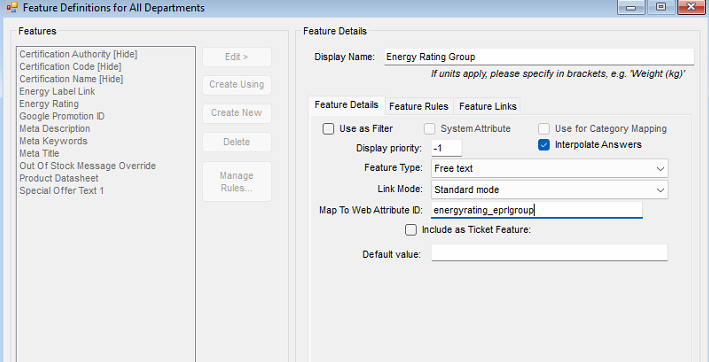
- **Display Name**: `Energy Rating Group`
- **Use as filter**: *Unchecked*
- **Display Priority**: `-1`
- **Feature Type**: `Free Text`
- **Map To Web Attribute ID**: `energyrating_eprlgroup`  
      
    [![image.png](https://kb.findesolutions.com/uploads/images/gallery/2025-06/scaled-1680-/6Lzc0xkm2KuZFnwr-image.png)](https://kb.findesolutions.com/uploads/images/gallery/2025-06/6Lzc0xkm2KuZFnwr-image.png)
6. Click **Save**.

#### 2. Applying Energy Rating Values to Products

Once set up, assign values based on the energy class range used:

<div class="_tableContainer_16hzy_1" id="bkmrk-range-used-value-to-"><div class="_tableWrapper_16hzy_14 group flex w-fit flex-col-reverse" tabindex="-1"><table class="w-fit min-w-(--thread-content-width)" data-end="1948" data-start="1765"><thead data-end="1810" data-start="1765"><tr data-end="1810" data-start="1765"><th data-col-size="sm" data-end="1791" data-start="1765">Range Used</th><th data-col-size="sm" data-end="1810" data-start="1791">Value to Input</th></tr></thead><tbody data-end="1948" data-start="1857"><tr data-end="1902" data-start="1857"><td data-col-size="sm" data-end="1883" data-start="1857">A to G (newer scale)</td><td data-col-size="sm" data-end="1902" data-start="1883">`2019`</td></tr><tr data-end="1948" data-start="1903"><td data-col-size="sm" data-end="1929" data-start="1903">A+++ to D (older scale)</td><td data-col-size="sm" data-end="1948" data-start="1929">`2013`</td></tr></tbody></table>

<div class="sticky end-(--thread-content-margin) h-0 self-end select-none"></div></div></div>- Apply the relevant value to the **Energy Rating Group** feature for each product like so.

Under the **Product Information &gt; Web** tab for the item, locate the new feature created, and populate with the required value.

[![image.png](https://kb.findesolutions.com/uploads/images/gallery/2025-06/scaled-1680-/cB2hJjf7apheAIkC-image.png)](https://kb.findesolutions.com/uploads/images/gallery/2025-06/cB2hJjf7apheAIkC-image.png)

<span data-ogsc="black" style="border: 0px; font-style: inherit; font-variant: inherit; font-weight: inherit; font-stretch: inherit; font-size: inherit; line-height: inherit; font-family: 'Calibri Light', sans-serif; font-optical-sizing: inherit; font-size-adjust: inherit; font-kerning: inherit; font-feature-settings: inherit; font-variation-settings: inherit; margin: 0px; padding: 0px; vertical-align: baseline; color: black !important;">This will then appear in the feed like the following for use by google merchant centre, or any other agency required to use the min/max efficiency class.</span>

[![firefox_XvaHnGT6uq.png](https://kb.findesolutions.com/uploads/images/gallery/2025-06/scaled-1680-/NRxf72ZY4ywvRNks-firefox-xvahngt6uq.png)](https://kb.findesolutions.com/uploads/images/gallery/2025-06/NRxf72ZY4ywvRNks-firefox-xvahngt6uq.png)