# Load Vans

<span class="TextRun SCXW163058001 BCX8" data-contrast="auto" lang="EN-GB" xml:lang="EN-GB"><span class="NormalTextRun SCXW163058001 BCX8">Start by pressing the </span></span><span class="TextRun SCXW163058001 BCX8" data-contrast="auto" lang="EN-GB" xml:lang="EN-GB"><span class="NormalTextRun SCXW163058001 BCX8">Load Vans</span></span><span class="TextRun SCXW163058001 BCX8" data-contrast="auto" lang="EN-GB" xml:lang="EN-GB"><span class="NormalTextRun SCXW163058001 BCX8"> option in the menu</span><span class="NormalTextRun SCXW163058001 BCX8">.</span></span><span class="EOP SCXW163058001 BCX8" data-ccp-props="{}"> </span>

[![Screenshot_20250131-161930.png](https://kb.findesolutions.com/uploads/images/gallery/2025-12/scaled-1680-/sVCLtugb58cMJt7V-screenshot-20250131-161930.png)](https://kb.findesolutions.com/uploads/images/gallery/2025-12/sVCLtugb58cMJt7V-screenshot-20250131-161930.png)

<div class="ListContainerWrapper SCXW143155858 BCX8" id="bkmrk-select-the-date-you-">- <span class="TextRun SCXW143155858 BCX8" data-contrast="auto" lang="EN-GB" xml:lang="EN-GB"><span class="NormalTextRun SCXW143155858 BCX8">Select a **Date Type**:  
    </span></span>
    - <span class="TextRun SCXW143155858 BCX8" data-contrast="auto" lang="EN-GB" xml:lang="EN-GB"><span class="NormalTextRun SCXW143155858 BCX8">**Delivery** - Date of Delivery</span></span>
    - <span class="TextRun SCXW143155858 BCX8" data-contrast="auto" lang="EN-GB" xml:lang="EN-GB"><span class="NormalTextRun SCXW143155858 BCX8">**Dispatch** - Used for Carriers, this is the date of collection rather than the date of the field call.</span></span>
- <span class="TextRun SCXW143155858 BCX8" data-contrast="auto" lang="EN-GB" xml:lang="EN-GB"><span class="NormalTextRun SCXW143155858 BCX8">Select the **Date** you are packing field calls for</span><span class="NormalTextRun SCXW143155858 BCX8">.</span></span>
- <span class="TextRun SCXW143155858 BCX8" data-contrast="auto" lang="EN-GB" xml:lang="EN-GB"><span class="NormalTextRun SCXW143155858 BCX8">Select the **Engineer** you are packing for.</span></span>
- <span class="TextRun SCXW143155858 BCX8" data-contrast="auto" lang="EN-GB" xml:lang="EN-GB"><span class="NormalTextRun SCXW143155858 BCX8">Select Specific **Carriers:** This allows you to pick for a group of engineers, intention for this is for picking for carrier who you have multiple service levels with.</span></span>
- <span class="TextRun SCXW143155858 BCX8" data-contrast="auto" lang="EN-GB" xml:lang="EN-GB"><span class="NormalTextRun SCXW143155858 BCX8">Scan</span><span class="NormalTextRun SCXW143155858 BCX8"> the **Location** you are packing to</span><span class="NormalTextRun SCXW143155858 BCX8">.</span></span><span class="EOP SCXW143155858 BCX8" data-ccp-props="{}"> </span>

</div><p class="callout info"><span class="EOP SCXW143155858 BCX8" data-ccp-props="{}"><span class="NormalTextRun SCXW29542525 BCX8">You can do a multi-stage pick, whereby you pick to a holding location and then on to another location afterwards, much like a multi-stage goods</span><span class="NormalTextRun SCXW29542525 BCX8">-</span><span class="NormalTextRun SCXW29542525 BCX8">in where the goods are held before being stored in their final location. </span></span></p>

- <span class="EOP SCXW143155858 BCX8" data-ccp-props="{}"><span class="NormalTextRun SCXW29542525 BCX8">If you wish to pick for all calls; Click **Select All**, or choose **Morning**/**Afternoon** instead.</span></span>
- <span class="EOP SCXW143155858 BCX8" data-ccp-props="{}"><span class="NormalTextRun SCXW29542525 BCX8">Click **Start Picking**</span></span>

[![image.png](https://kb.findesolutions.com/uploads/images/gallery/2025-12/scaled-1680-/ytUizpIJkgOvhR3s-image.png)](https://kb.findesolutions.com/uploads/images/gallery/2025-12/ytUizpIJkgOvhR3s-image.png)

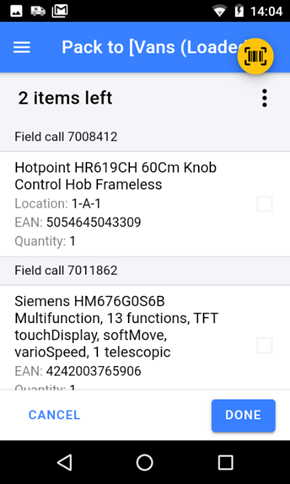
- <span class="TextRun SCXW199904355 BCX8" data-contrast="auto" lang="EN-GB" xml:lang="EN-GB"><span class="NormalTextRun SCXW199904355 BCX8">Locate each item on the list and scan the stock number label</span></span>
- <span class="TextRun SCXW199904355 BCX8" data-contrast="auto" lang="EN-GB" xml:lang="EN-GB"><span class="NormalTextRun SCXW199904355 BCX8"><span class="TextRun SCXW46835472 BCX8" data-contrast="auto" lang="EN-GB" xml:lang="EN-GB"><span class="NormalTextRun SCXW46835472 BCX8">Once the item is picked, it will have a tick against the item <span class="TextRun SCXW160183546 BCX8" data-contrast="auto" lang="EN-GB" xml:lang="EN-GB"><span class="NormalTextRun SCXW160183546 BCX8">(or the item may disappear of the list)</span></span></span></span></span></span>

<p class="callout info"><span class="TextRun SCXW233728177 BCX8" data-contrast="auto" lang="EN-GB" xml:lang="EN-GB"><span class="NormalTextRun SCXW233728177 BCX8">I</span><span class="NormalTextRun SCXW233728177 BCX8">f your configuration allows you to, you can scan a different stock number to the one displayed and NCompass will stock swap the stock number for the one you scanne</span><span class="NormalTextRun SCXW233728177 BCX8">d</span><span class="NormalTextRun SCXW233728177 BCX8">.</span></span><span class="EOP SCXW233728177 BCX8" data-ccp-props="{}"> </span></p>

- <span class="EOP SCXW233728177 BCX8" data-ccp-props="{}">Once you have finished picking click **DONE**</span>

### <span class="EOP SCXW233728177 BCX8" data-ccp-props="{}">Settings</span>

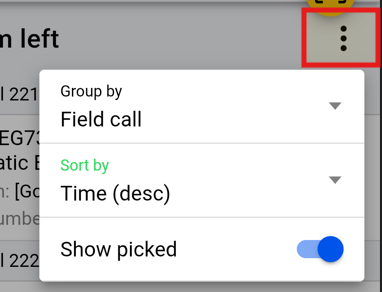
<span class="EOP SCXW233728177 BCX8" data-ccp-props="{}">Clicking on the 3 dots gives you the option to:  
</span>

- <span class="EOP SCXW233728177 BCX8" data-ccp-props="{}">**Group by**:</span>
    - <span class="EOP SCXW233728177 BCX8" data-ccp-props="{}">**Stock Location** - Sorts them into order by location instead of by time.</span>
    - <span class="EOP SCXW233728177 BCX8" data-ccp-props="{}">**Field Call (Default)** - Sorts by time of call</span>
    - <span class="EOP SCXW233728177 BCX8" data-ccp-props="{}">**Branch** - Shows all branches not just your physical location</span>
- <span class="EOP SCXW233728177 BCX8" data-ccp-props="{}">**Sort by**:</span>
    - <span class="EOP SCXW233728177 BCX8" data-ccp-props="{}">**Time DESC (Default)** - logical order for loading van, first on is last off.</span>
    - <span class="EOP SCXW233728177 BCX8" data-ccp-props="{}">**Time ASC** - flips the loading order</span>
- <span class="EOP SCXW233728177 BCX8" data-ccp-props="{}">**Show Picked** - Shows the item picked if enabled but with a Green Tick, otherwise they will be hidden.</span>

[![image.png](https://kb.findesolutions.com/uploads/images/gallery/2025-12/scaled-1680-/P3FulVnu998b5dc5-image.png)](https://kb.findesolutions.com/uploads/images/gallery/2025-12/P3FulVnu998b5dc5-image.png)