# CIH/Euronics Data Feed Update July 2026

## Overview

The CIH feeds provided to your system for both products and the marketplace run using an address that your NCompass system connects to.

Unfortunately, CIH have had an issue with the services that provides the connection to this service but have now got a solution in place that will allow your data feeds to resume working. This requires a small tweak in your NCompass system.


## How To

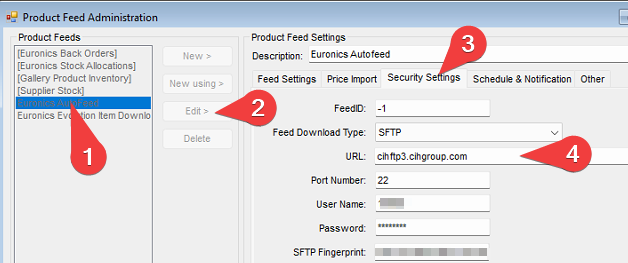
In your NCompass system, go to `Administration > Product Feeds`.

<table border="1" id="bkmrk-select-the-euronics-" style="border-collapse: collapse; width: 100%; border-width: 0px;"><colgroup><col style="width: 50%;"></col><col style="width: 50%;"></col></colgroup><tbody><tr><td style="border-width: 0px;">1. Select the `Euronics Autofeed` on the left.
2. Press `Edit >`.
3. Click on the `Security Settings` tab.
4. Edit the `URL` to be `cihftp3.cihgroup.com` - it will currently read `cihftp.cihgroup.com`. If it already says this, you need to do nothing else.
5. Press the `Save` button once done.

</td><td style="border-width: 0px;">[![image.png](https://kb.findesolutions.com/uploads/images/gallery/2026-07/scaled-1680-/eRN8EBhv8eFxBzqp-image.png)](https://kb.findesolutions.com/uploads/images/gallery/2026-07/eRN8EBhv8eFxBzqp-image.png)

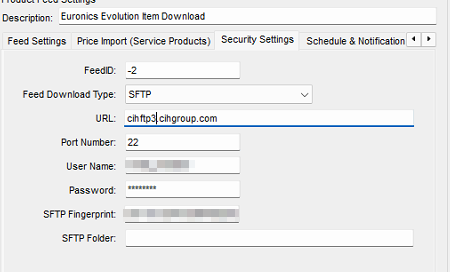
</td></tr><tr><td style="border-width: 0px;">Repeat the **same steps** for the `Euronics Evolution Item Download` feed. </td><td style="border-width: 0px;">[![image.png](https://kb.findesolutions.com/uploads/images/gallery/2026-07/scaled-1680-/mLa2ux50sSdmaPOC-image.png)](https://kb.findesolutions.com/uploads/images/gallery/2026-07/mLa2ux50sSdmaPOC-image.png)

</td></tr></tbody></table>

<p class="callout danger">Do not change **any other** settings in this tab.</p>

## Additional Information

None currently

## Frequently Asked Questions

<details id="bkmrk-i-cannot-access-the-"><summary>I cannot access the administration menu to alter the feeds!</summary>

Your NCompass user must have administration rights or [security rights](https://kb.findesolutions.com/books/ncompass-administration/page/ncompass-security-roles) to access the menu required.

</details>