There is only one order status update for Tesco which can be sent. This is sending the order status update of "Shipped" after completing a field call linked to the imported sale.
After a Tesco order is imported into NCompass, a field call will need to be raised for the order. Once this field call is marked as "Completed" NCompass will queue to send a "Shipped" status update to the associated WebOrder. **Steps: Open NCompass Tesco Web order > Book field call > Mark field call as completed > NCompass ServerGUI sends update**NCompass will not send Carrier Tracking Consignments by default and this will need to be setup before you can send any directly to Tesco
[**Linking Couriers to Marketplace**](https://kb.findesolutions.com/books/marketplace-integration/page/mapping-couriers-to-marketplaces) ServerGUI will handle the sending of any shipping updates and the timings of this can be set within Marketplace Settings [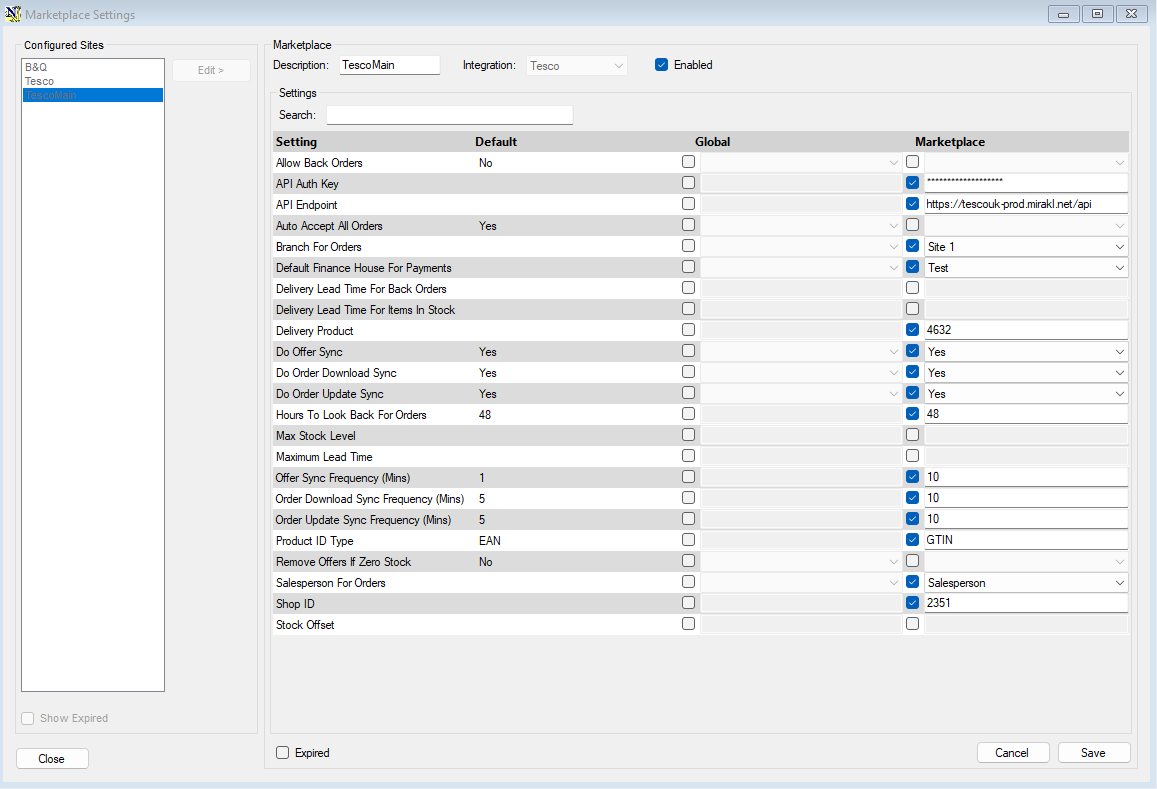](https://kb.findesolutions.com/uploads/images/gallery/2025-11/zTbGfQj26uaWUhAV-image.png) Relevant Settings: Order Update Sync Frequency - how often to send order updates in minutesIf you're not sure call into Support to ask for more information [01892 342 916](tel:+441892342916)