# Creating a New Marketplace

When setting up a new Marketplace you only need to configure a few settings within NCompass to activate a new Marketplace. This will vary sightly between different marketplace integrations. this guide will follow the general steps for the B&amp;Q integration.

### Create a new Web-Site

We will need to create a brand new web-site within NCompass where we will assign the integration type and select the Marketplace Channel.

---

#### **Step 1 - Making a new Web-Site**

On NCompass, go under Administration &gt; Multi-Channel &gt; Web Sites

Create a new website by pressing "New". Give it a descriptive name and select a corresponding price category to list product pricing under.

Set the Channel Type to "Marketplace"

Select the integration type (in this case B&amp;Q)

[![image.png](https://kb.findesolutions.com/uploads/images/gallery/2025-09/scaled-1680-/J8WU9A59dB0k97zx-image.png)](https://kb.findesolutions.com/uploads/images/gallery/2025-09/J8WU9A59dB0k97zx-image.png)

Press save and you can move on to the next step.

<p class="callout info"> **Other settings are optional, this guide is covering the bare minimum setup to link a marketplace**</p>

#### **Step 2 - Set Marketplace Settings**

Go Back to Administration &gt; Multi-Channel &gt; Marketplace Settings

Select the new Marketplace Web-Site name you've just created and press Edit &gt; (It will appear if you chose marketplace channel type on Web-sites administration)

You can update the description here and ensure the integration matches the one set within web-sites

Make sure the marketplace is **enabled**

##### The following settings are needed for API calls to B&amp;Q:

1. **API Endpoint**
2. **Shop ID**
3. **API Auth Key**

[![image.png](https://kb.findesolutions.com/uploads/images/gallery/2025-09/scaled-1680-/rDHC98dzvU3kGR1e-image.png)](https://kb.findesolutions.com/uploads/images/gallery/2025-09/rDHC98dzvU3kGR1e-image.png)
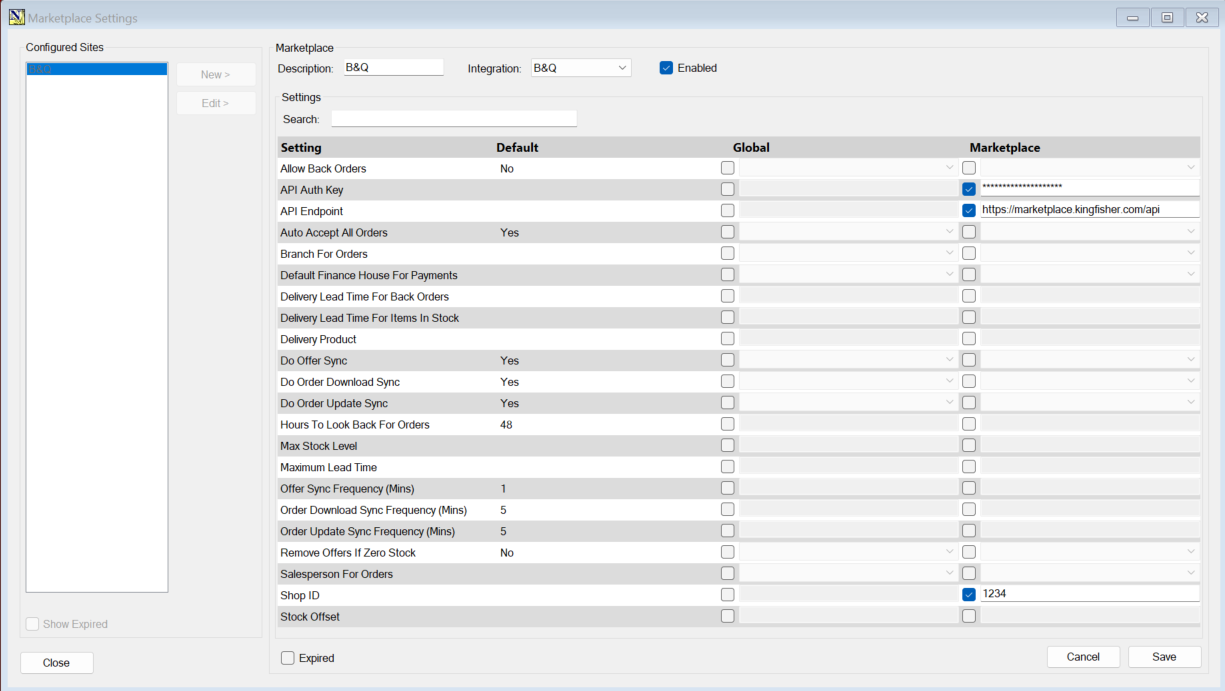
All you need are the 3 settings above for the minimum B&amp;Q setup

<p class="callout info">The vast majority of marketplace configs will be present within this Tab instead of Tools &gt; Config</p>

##### **Final Considerations:**

- Create an unmatched product, ensure there is an unmatched web product linked to an actual unmatched item otherwise downloaded orders without a product link will return a BLANK sundry line