# Applying Extended Warranties to Categories in NCompass

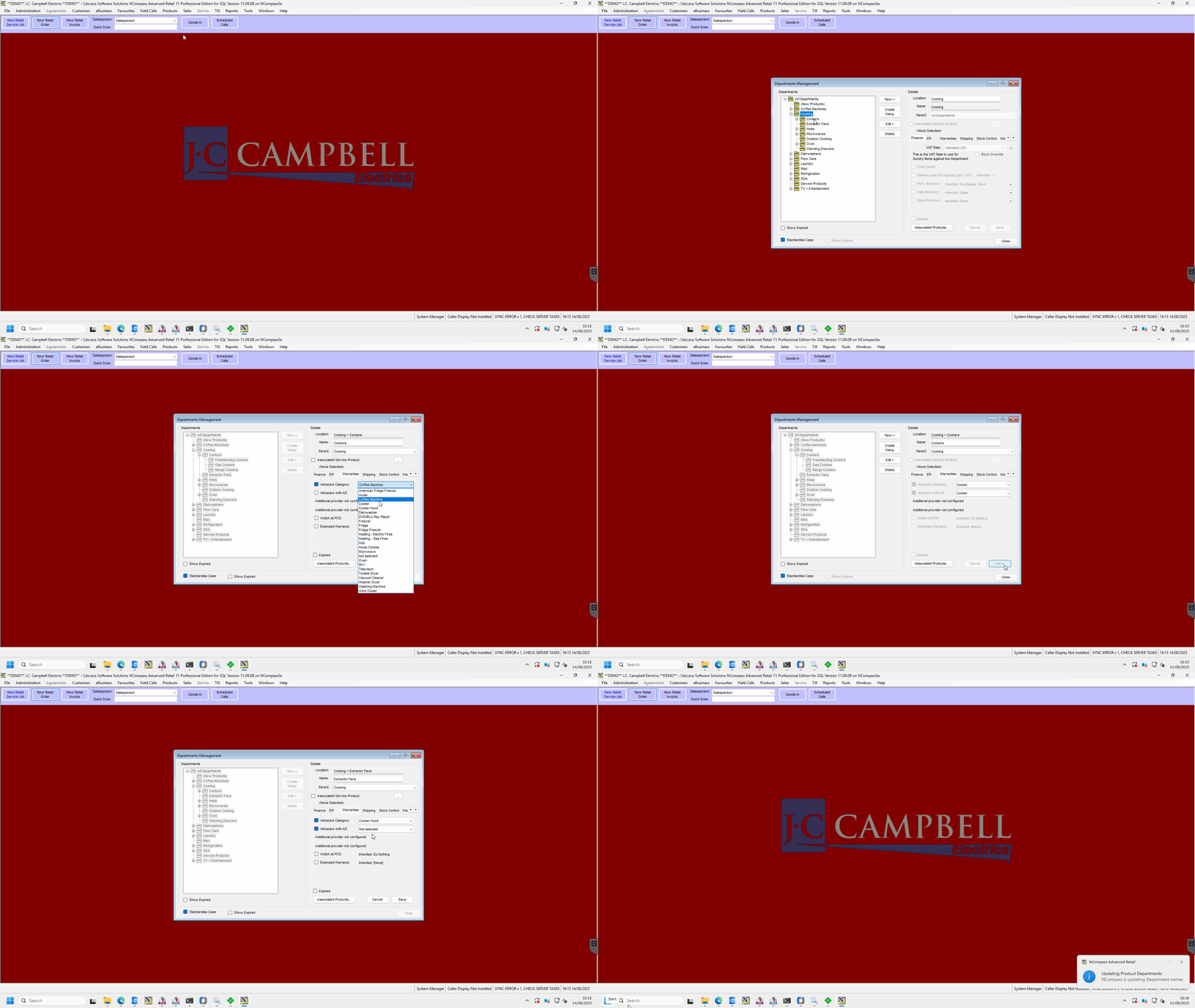
<article class="text-token-text-primary w-full focus:outline-none scroll-mt-[calc(var(--header-height)+min(200px,max(70px,20svh)))]" data-scroll-anchor="true" data-testid="conversation-turn-10" data-turn="assistant" data-turn-id="request-WEB:74df6eec-8f62-48ce-aa59-bac317f5430d-57" dir="auto" id="bkmrk-this-guide-explains-" tabindex="-1">This guide explains how to assign extended warranty categories to departments in NCompass so that they apply correctly across your product structure.

</article>#### **Demonstration**

[![TeamViewer_fVd3EXy7ay.gif](https://kb.findesolutions.com/uploads/images/gallery/2025-08/uWWPsXdDjvY6d1M5-teamviewer-fvd3exy7ay.gif)](https://kb.findesolutions.com/uploads/images/gallery/2025-08/uWWPsXdDjvY6d1M5-teamviewer-fvd3exy7ay.gif)

<article class="text-token-text-primary w-full focus:outline-none scroll-mt-[calc(var(--header-height)+min(200px,max(70px,20svh)))]" data-scroll-anchor="true" data-testid="conversation-turn-10" data-turn="assistant" data-turn-id="request-WEB:74df6eec-8f62-48ce-aa59-bac317f5430d-57" dir="auto" id="bkmrk-1.-open-department-m" tabindex="-1"><div class="text-base my-auto mx-auto pb-10 [--thread-content-margin:--spacing(4)] @[37rem]:[--thread-content-margin:--spacing(6)] @[72rem]:[--thread-content-margin:--spacing(16)] px-(--thread-content-margin)"><div class="[--thread-content-max-width:32rem] @[34rem]:[--thread-content-max-width:40rem] @[64rem]:[--thread-content-max-width:48rem] mx-auto max-w-(--thread-content-max-width) flex-1 group/turn-messages focus-visible:outline-hidden relative flex w-full min-w-0 flex-col agent-turn" tabindex="-1"><div class="flex max-w-full flex-col grow"><div class="min-h-8 text-message relative flex w-full flex-col items-end gap-2 text-start break-words whitespace-normal [.text-message+&]:mt-5" data-message-author-role="assistant" data-message-id="5a338c9b-8971-4984-99d3-769c862f7d78" data-message-model-slug="gpt-5-instant" dir="auto"><div class="flex w-full flex-col gap-1 empty:hidden first:pt-[3px]"><div class="markdown prose dark:prose-invert w-full break-words light markdown-new-styling">---

</div></div></div></div></div></div>#### 1. Open Department Management

<div class="text-base my-auto mx-auto pb-10 [--thread-content-margin:--spacing(4)] @[37rem]:[--thread-content-margin:--spacing(6)] @[72rem]:[--thread-content-margin:--spacing(16)] px-(--thread-content-margin)"><div class="[--thread-content-max-width:32rem] @[34rem]:[--thread-content-max-width:40rem] @[64rem]:[--thread-content-max-width:48rem] mx-auto max-w-(--thread-content-max-width) flex-1 group/turn-messages focus-visible:outline-hidden relative flex w-full min-w-0 flex-col agent-turn" tabindex="-1"><div class="flex max-w-full flex-col grow"><div class="min-h-8 text-message relative flex w-full flex-col items-end gap-2 text-start break-words whitespace-normal [.text-message+&]:mt-5" data-message-author-role="assistant" data-message-id="5a338c9b-8971-4984-99d3-769c862f7d78" data-message-model-slug="gpt-5-instant" dir="auto"><div class="flex w-full flex-col gap-1 empty:hidden first:pt-[3px]"><div class="markdown prose dark:prose-invert w-full break-words light markdown-new-styling">1. In NCompass, go to **Department Management**.
2. Locate the departments that do **not yet have a warranty category assigned**.

---

</div></div></div></div></div></div>#### 2. Assign a Warranty Category

<div class="text-base my-auto mx-auto pb-10 [--thread-content-margin:--spacing(4)] @[37rem]:[--thread-content-margin:--spacing(6)] @[72rem]:[--thread-content-margin:--spacing(16)] px-(--thread-content-margin)"><div class="[--thread-content-max-width:32rem] @[34rem]:[--thread-content-max-width:40rem] @[64rem]:[--thread-content-max-width:48rem] mx-auto max-w-(--thread-content-max-width) flex-1 group/turn-messages focus-visible:outline-hidden relative flex w-full min-w-0 flex-col agent-turn" tabindex="-1"><div class="flex max-w-full flex-col grow"><div class="min-h-8 text-message relative flex w-full flex-col items-end gap-2 text-start break-words whitespace-normal [.text-message+&]:mt-5" data-message-author-role="assistant" data-message-id="5a338c9b-8971-4984-99d3-769c862f7d78" data-message-model-slug="gpt-5-instant" dir="auto"><div class="flex w-full flex-col gap-1 empty:hidden first:pt-[3px]"><div class="markdown prose dark:prose-invert w-full break-words light markdown-new-styling">1. Select the department you want to configure.
2. From the **Warranty Category** list, choose the category you wish to apply.
3. Example: Assigning **Cookers** to **Cooking &gt; Cookers** will cause the subcategories:
    
    
    - **Freestanding Cookers**
    - **Gas Cookers**
    - **Range Cookers**  
        to automatically inherit the warranty category. (as seen below)

</div></div></div></div></div></div>[![image.png](https://kb.findesolutions.com/uploads/images/gallery/2025-08/scaled-1680-/AJ1FMpCZefm7oZn7-image.png)](https://kb.findesolutions.com/uploads/images/gallery/2025-08/AJ1FMpCZefm7oZn7-image.png)

<div class="text-base my-auto mx-auto pb-10 [--thread-content-margin:--spacing(4)] @[37rem]:[--thread-content-margin:--spacing(6)] @[72rem]:[--thread-content-margin:--spacing(16)] px-(--thread-content-margin)"><div class="[--thread-content-max-width:32rem] @[34rem]:[--thread-content-max-width:40rem] @[64rem]:[--thread-content-max-width:48rem] mx-auto max-w-(--thread-content-max-width) flex-1 group/turn-messages focus-visible:outline-hidden relative flex w-full min-w-0 flex-col agent-turn" tabindex="-1"><div class="flex max-w-full flex-col grow"><div class="min-h-8 text-message relative flex w-full flex-col items-end gap-2 text-start break-words whitespace-normal [.text-message+&]:mt-5" data-message-author-role="assistant" data-message-id="5a338c9b-8971-4984-99d3-769c862f7d78" data-message-model-slug="gpt-5-instant" dir="auto"><div class="flex w-full flex-col gap-1 empty:hidden first:pt-[3px]"><div class="markdown prose dark:prose-invert w-full break-words light markdown-new-styling">---

</div></div></div></div></div></div>#### 3. When to Apply at the Lowest Level

<div class="text-base my-auto mx-auto pb-10 [--thread-content-margin:--spacing(4)] @[37rem]:[--thread-content-margin:--spacing(6)] @[72rem]:[--thread-content-margin:--spacing(16)] px-(--thread-content-margin)"><div class="[--thread-content-max-width:32rem] @[34rem]:[--thread-content-max-width:40rem] @[64rem]:[--thread-content-max-width:48rem] mx-auto max-w-(--thread-content-max-width) flex-1 group/turn-messages focus-visible:outline-hidden relative flex w-full min-w-0 flex-col agent-turn" tabindex="-1"><div class="flex max-w-full flex-col grow"><div class="min-h-8 text-message relative flex w-full flex-col items-end gap-2 text-start break-words whitespace-normal [.text-message+&]:mt-5" data-message-author-role="assistant" data-message-id="5a338c9b-8971-4984-99d3-769c862f7d78" data-message-model-slug="gpt-5-instant" dir="auto"><div class="flex w-full flex-col gap-1 empty:hidden first:pt-[3px]"><div class="markdown prose dark:prose-invert w-full break-words light markdown-new-styling">- Apply at the **lowest category level** only when its warranty category differs from its parent.
- This can happen when the parent category covers a broader set of products, and the subcategory needs a unique warranty category (e.g., a tuple of categories under the parent).

---

</div></div></div></div></div></div>#### 4. Selecting from the Warranty Category List

<div class="text-base my-auto mx-auto pb-10 [--thread-content-margin:--spacing(4)] @[37rem]:[--thread-content-margin:--spacing(6)] @[72rem]:[--thread-content-margin:--spacing(16)] px-(--thread-content-margin)"><div class="[--thread-content-max-width:32rem] @[34rem]:[--thread-content-max-width:40rem] @[64rem]:[--thread-content-max-width:48rem] mx-auto max-w-(--thread-content-max-width) flex-1 group/turn-messages focus-visible:outline-hidden relative flex w-full min-w-0 flex-col agent-turn" tabindex="-1"><div class="flex max-w-full flex-col grow"><div class="min-h-8 text-message relative flex w-full flex-col items-end gap-2 text-start break-words whitespace-normal [.text-message+&]:mt-5" data-message-author-role="assistant" data-message-id="5a338c9b-8971-4984-99d3-769c862f7d78" data-message-model-slug="gpt-5-instant" dir="auto"><div class="flex w-full flex-col gap-1 empty:hidden first:pt-[3px]"><div class="markdown prose dark:prose-invert w-full break-words light markdown-new-styling">- When configuring, you will see the full list of available warranty categories.
- Choose the most relevant one for your department or subcategory.

---

</div></div></div></div></div></div></article>