# New Page

<span style="mso-no-proof: no;"> </span>

<span style="font-size: 36.0pt; mso-bidi-font-size: 72.0pt; color: #548dd4; mso-themecolor: text2; mso-themetint: 153;"><span style="mso-spacerun: yes;"> </span></span>

<span style="font-size: 36.0pt; mso-bidi-font-size: 72.0pt; color: #548dd4; mso-themecolor: text2; mso-themetint: 153;">Human Resources Module</span>

<span style="font-size: 20.0pt; mso-bidi-font-size: 24.0pt; color: #548dd4; mso-themecolor: text2; mso-themetint: 153;">Holiday &amp; Overtime Planning and Approval</span>

<span style="font-size: 36.0pt; mso-bidi-font-size: 72.0pt; color: #548dd4; mso-themecolor: text2; mso-themetint: 153;"> </span>

<span style="font-size: 26.0pt; color: blue;"> </span>

**<span style="font-size: 28.0pt; color: blue;">Procedure Guide for NCompass</span>**

**<span style="font-size: 28.0pt; color: blue;"> </span>**

**<span style="font-size: 14.0pt;">NCompass Versions 11.15 (and Above)</span>**

**<span style="font-size: 36.0pt; color: blue;"> </span>**

<a name="_Toc88286650"></a>**<span style="mso-bidi-font-size: 10.0pt;"> </span>**

<span style="mso-bookmark: _Toc88286650;">**<span style="mso-bidi-font-size: 10.0pt;">This guide covers your core system please keep it to hand for reference.</span>**</span>

<span style="mso-bookmark: _Toc88286650;">**<span style="mso-bidi-font-size: 10.0pt;"> </span>**</span>

<span style="mso-bookmark: _Toc88286650;">**<span style="mso-bidi-font-size: 10.0pt;"> </span>**</span>

<span style="mso-bookmark: _Toc88286650;">**<span style="mso-bidi-font-size: 10.0pt;">Rev. 1.0</span>**</span>

<span style="mso-bookmark: _Toc88286650;">**<span style="mso-bidi-font-size: 10.0pt;">Authors DP</span>**</span>

<span style="mso-bookmark: _Toc88286650;">**<span style="mso-bidi-font-size: 10.0pt;"> </span>**</span>

<span style="mso-bookmark: _Toc88286650;">**<span style="mso-bidi-font-size: 10.0pt;"> </span>**</span>

<span style="mso-bookmark: _Toc88286650;">**<span style="mso-bidi-font-size: 10.0pt;">T</span>**</span><span style="mso-bookmark: _Toc88286650;">**<span style="font-size: 9.0pt;">he latest Version of this guide is available in the Calculus Knowledge Base</span>**</span>

<span style="mso-bookmark: _Toc88286650;">**<span style="font-size: 9.0pt;"><span style="mso-spacerun: yes;"> </span></span>**</span>

<span style="mso-bookmark: _Toc88286650;">**<span style="mso-bidi-font-size: 10.0pt;"> </span>**</span>

<span style="mso-bookmark: _Toc88286650;">**<span style="mso-bidi-font-size: 10.0pt;"> </span>**</span>

<span style="mso-bookmark: _Toc88286650;">**<span style="mso-bidi-font-size: 10.0pt;"> </span>**</span>

<span style="mso-bookmark: _Toc88286650;">**<span style="mso-bidi-font-size: 10.0pt;"> </span>**</span>

<span style="mso-bookmark: _Toc88286650;">**<span style="mso-bidi-font-size: 10.0pt;"> </span>**</span>

<span style="mso-bookmark: _Toc88286650;">**<span style="mso-bidi-font-size: 10.0pt;"> </span>**</span>

<span style="mso-bookmark: _Toc88286650;">**<span style="mso-bidi-font-size: 10.0pt;">Need further help?</span>**</span>

<span style="mso-bookmark: _Toc88286650;"><span style="mso-bidi-font-size: 10.0pt;"> </span></span>

<span style="mso-bookmark: _Toc88286650;"><span style="mso-bidi-font-size: 10.0pt;"> </span></span>

<span style="mso-bookmark: _Toc88286650;"><span style="mso-bidi-font-size: 10.0pt;">Call Support on 0845 125 9193</span></span>

<span style="mso-bookmark: _Toc88286650;"><span style="mso-bidi-font-size: 10.0pt;">You can also email </span></span>[<span style="mso-bookmark: _Toc88286650;"><span style="mso-bidi-font-size: 10.0pt;">support@findesolutions.com</span></span>](mailto:support@findesolutions.com)

<span style="mso-bookmark: _Toc88286650;"><span class="MsoHyperlink"><span style="mso-bidi-font-size: 10.0pt;"><span style="mso-spacerun: yes;"> </span></span></span></span>

<span style="mso-bookmark: _Toc88286650;"><span style="mso-bidi-font-size: 10.0pt;"> </span></span>

<span style="mso-bookmark: _Toc88286650;"><span style="mso-bidi-font-size: 10.0pt;"> </span></span>

<span style="mso-bookmark: _Toc88286650;"><span style="mso-bidi-font-size: 10.0pt;"> </span></span>

<span style="mso-bookmark: _Toc88286650;"><span style="mso-bidi-font-size: 10.0pt;">Your Calculus Software Solutions support cover:</span></span>

<span style="mso-bookmark: _Toc88286650;"><span style="mso-bidi-font-size: 10.0pt;"> </span></span>

<table border="1" cellpadding="0" cellspacing="0" class="MsoNormalTable" id="bkmrk-monday-%E2%80%93-friday-9am-" style="border-collapse: collapse; border: none; mso-border-alt: solid windowtext .5pt; mso-yfti-tbllook: 480; mso-padding-alt: 0cm 5.4pt 0cm 5.4pt; mso-border-insideh: .5pt solid windowtext; mso-border-insidev: .5pt solid windowtext;"><tbody><tr style="mso-yfti-irow: 0; mso-yfti-firstrow: yes;"><td style="width: 260.5pt; border: solid windowtext 1.0pt; mso-border-alt: solid windowtext .5pt; padding: 0cm 5.4pt 0cm 5.4pt;" valign="top" width="347"><span style="mso-bookmark: _Toc88286650;"><span style="font-size: 9.0pt; mso-bidi-font-size: 10.0pt;">Monday – Friday 9am-5pm</span></span>

</td><td style="width: 260.5pt; border: solid windowtext 1.0pt; border-left: none; mso-border-left-alt: solid windowtext .5pt; mso-border-alt: solid windowtext .5pt; padding: 0cm 5.4pt 0cm 5.4pt;" valign="top" width="347"><span style="mso-bookmark: _Toc88286650;">**<span style="mso-bidi-font-size: 10.0pt;">For the duration of your contract.</span>**</span>

</td></tr><tr style="mso-yfti-irow: 1; mso-yfti-lastrow: yes;"><td style="width: 260.5pt; border: solid windowtext 1.0pt; border-top: none; mso-border-top-alt: solid windowtext .5pt; mso-border-alt: solid windowtext .5pt; padding: 0cm 5.4pt 0cm 5.4pt;" valign="top" width="347"><span style="mso-bookmark: _Toc88286650;"><span style="mso-bidi-font-size: 10.0pt;">Outside the above hours, including weekends</span></span>

</td><td style="width: 260.5pt; border-top: none; border-left: none; border-bottom: solid windowtext 1.0pt; border-right: solid windowtext 1.0pt; mso-border-top-alt: solid windowtext .5pt; mso-border-left-alt: solid windowtext .5pt; mso-border-alt: solid windowtext .5pt; padding: 0cm 5.4pt 0cm 5.4pt;" valign="top" width="347"><span style="mso-bookmark: _Toc88286650;">**<span style="mso-bidi-font-size: 10.0pt;">£75 plus VAT per incident</span>**</span>

</td></tr></tbody></table>

<span style="mso-bookmark: _Toc88286650;"><span style="mso-bidi-font-size: 10.0pt;"> </span></span>

<span style="mso-bookmark: _Toc88286650;"><span style="mso-bidi-font-size: 10.0pt;"> </span></span>

<span style="mso-bookmark: _Toc88286650;">**<span style="mso-bidi-font-size: 10.0pt;">For help using your system, please call 0845 125 9193</span>**</span>

<span style="mso-bookmark: _Toc88286650;">**<span style="mso-bidi-font-size: 10.0pt;">For out of hours Support 0845 833 9196</span>**</span>

<span style="mso-bookmark: _Toc88286650;">**<span style="mso-bidi-font-size: 10.0pt;">For sales enquiries such as till rolls or system upgrades, please call 0845 125 9192</span>**</span>

<span style="mso-bookmark: _Toc88286650;">**<span style="mso-bidi-font-size: 10.0pt;">For VeriFone queries, please call their Helpline on 08444 828222.</span>**</span>

<span style="mso-bookmark: _Toc88286650;"><span style="mso-spacerun: yes;"> </span></span>

<span style="mso-bookmark: _Toc88286650;"><span style="mso-ansi-language: EN-GB;"> </span></span>

[<span style="mso-bookmark: _Toc88286650;">Overview</span><span style="mso-bookmark: _Toc88286650;"><span style="color: windowtext; display: none; mso-hide: screen;"><span style="mso-tab-count: 1 dotted;">. </span></span></span><span style="mso-bookmark: _Toc88286650;"><span style="color: windowtext; display: none; mso-hide: screen;">5</span></span>](#_Toc226641998)

[<span style="mso-bookmark: _Toc88286650;">Features</span><span style="mso-bookmark: _Toc88286650;"><span style="color: windowtext; display: none; mso-hide: screen;"><span style="mso-tab-count: 1 dotted;">. </span></span></span><span style="mso-bookmark: _Toc88286650;"><span style="color: windowtext; display: none; mso-hide: screen;">5</span></span>](#_Toc226641999)

[<span style="mso-bookmark: _Toc88286650;"><span style="mso-no-proof: yes;">Holidays</span></span><span style="mso-bookmark: _Toc88286650;"><span style="color: windowtext; display: none; mso-hide: screen; mso-no-proof: yes;"><span style="mso-tab-count: 1 dotted;">. </span></span></span><span style="mso-bookmark: _Toc88286650;"><span style="color: windowtext; display: none; mso-hide: screen; mso-no-proof: yes;">5</span></span>](#_Toc226642000)

[<span style="mso-bookmark: _Toc88286650;"><span style="mso-no-proof: yes;">Leave &amp; Absence Types</span></span><span style="mso-bookmark: _Toc88286650;"><span style="color: windowtext; display: none; mso-hide: screen; mso-no-proof: yes;"><span style="mso-tab-count: 1 dotted;">. </span></span></span><span style="mso-bookmark: _Toc88286650;"><span style="color: windowtext; display: none; mso-hide: screen; mso-no-proof: yes;">5</span></span>](#_Toc226642001)

[<span style="mso-bookmark: _Toc88286650;"><span style="mso-fareast-font-family: 'Times New Roman'; mso-fareast-theme-font: major-fareast; mso-no-proof: yes;">Annual Leave Allowance</span></span><span style="mso-bookmark: _Toc88286650;"><span style="color: windowtext; display: none; mso-hide: screen; mso-no-proof: yes;"><span style="mso-tab-count: 1 dotted;">. </span></span></span><span style="mso-bookmark: _Toc88286650;"><span style="color: windowtext; display: none; mso-hide: screen; mso-no-proof: yes;">5</span></span>](#_Toc226642002)

[<span style="mso-bookmark: _Toc88286650;"><span style="mso-no-proof: yes;">Rules &amp; Validation</span></span><span style="mso-bookmark: _Toc88286650;"><span style="color: windowtext; display: none; mso-hide: screen; mso-no-proof: yes;"><span style="mso-tab-count: 1 dotted;">. </span></span></span><span style="mso-bookmark: _Toc88286650;"><span style="color: windowtext; display: none; mso-hide: screen; mso-no-proof: yes;">6</span></span>](#_Toc226642003)

[<span style="mso-bookmark: _Toc88286650;"><span style="mso-no-proof: yes;">Staff Features</span></span><span style="mso-bookmark: _Toc88286650;"><span style="color: windowtext; display: none; mso-hide: screen; mso-no-proof: yes;"><span style="mso-tab-count: 1 dotted;">. </span></span></span><span style="mso-bookmark: _Toc88286650;"><span style="color: windowtext; display: none; mso-hide: screen; mso-no-proof: yes;">6</span></span>](#_Toc226642004)

[<span style="mso-bookmark: _Toc88286650;"><span style="mso-no-proof: yes;">Manager Features</span></span><span style="mso-bookmark: _Toc88286650;"><span style="color: windowtext; display: none; mso-hide: screen; mso-no-proof: yes;"><span style="mso-tab-count: 1 dotted;">. </span></span></span><span style="mso-bookmark: _Toc88286650;"><span style="color: windowtext; display: none; mso-hide: screen; mso-no-proof: yes;">6</span></span>](#_Toc226642005)

[<span style="mso-bookmark: _Toc88286650;"><span style="mso-no-proof: yes;">HR Features</span></span><span style="mso-bookmark: _Toc88286650;"><span style="color: windowtext; display: none; mso-hide: screen; mso-no-proof: yes;"><span style="mso-tab-count: 1 dotted;">. </span></span></span><span style="mso-bookmark: _Toc88286650;"><span style="color: windowtext; display: none; mso-hide: screen; mso-no-proof: yes;">7</span></span>](#_Toc226642006)

[<span style="mso-bookmark: _Toc88286650;"><span style="mso-no-proof: yes;">Notifications</span></span><span style="mso-bookmark: _Toc88286650;"><span style="color: windowtext; display: none; mso-hide: screen; mso-no-proof: yes;"><span style="mso-tab-count: 1 dotted;"> </span></span></span><span style="mso-bookmark: _Toc88286650;"><span style="color: windowtext; display: none; mso-hide: screen; mso-no-proof: yes;">7</span></span>](#_Toc226642007)

[<span style="mso-bookmark: _Toc88286650;"><span style="mso-no-proof: yes;">Reports</span></span><span style="mso-bookmark: _Toc88286650;"><span style="color: windowtext; display: none; mso-hide: screen; mso-no-proof: yes;"><span style="mso-tab-count: 1 dotted;">. </span></span></span><span style="mso-bookmark: _Toc88286650;"><span style="color: windowtext; display: none; mso-hide: screen; mso-no-proof: yes;">7</span></span>](#_Toc226642008)

[<span style="mso-bookmark: _Toc88286650;"><span style="mso-no-proof: yes;">Calendar Integration</span></span><span style="mso-bookmark: _Toc88286650;"><span style="color: windowtext; display: none; mso-hide: screen; mso-no-proof: yes;"><span style="mso-tab-count: 1 dotted;">. </span></span></span><span style="mso-bookmark: _Toc88286650;"><span style="color: windowtext; display: none; mso-hide: screen; mso-no-proof: yes;">8</span></span>](#_Toc226642009)

[<span style="mso-bookmark: _Toc88286650;"><span style="mso-no-proof: yes;">Staff Features</span></span><span style="mso-bookmark: _Toc88286650;"><span style="color: windowtext; display: none; mso-hide: screen; mso-no-proof: yes;"><span style="mso-tab-count: 1 dotted;">. </span></span></span><span style="mso-bookmark: _Toc88286650;"><span style="color: windowtext; display: none; mso-hide: screen; mso-no-proof: yes;">8</span></span>](#_Toc226642010)

[<span style="mso-bookmark: _Toc88286650;"><span style="mso-no-proof: yes;">Manager Features</span></span><span style="mso-bookmark: _Toc88286650;"><span style="color: windowtext; display: none; mso-hide: screen; mso-no-proof: yes;"><span style="mso-tab-count: 1 dotted;">. </span></span></span><span style="mso-bookmark: _Toc88286650;"><span style="color: windowtext; display: none; mso-hide: screen; mso-no-proof: yes;">8</span></span>](#_Toc226642011)

[<span style="mso-bookmark: _Toc88286650;"><span style="mso-no-proof: yes;">HR Features</span></span><span style="mso-bookmark: _Toc88286650;"><span style="color: windowtext; display: none; mso-hide: screen; mso-no-proof: yes;"><span style="mso-tab-count: 1 dotted;">. </span></span></span><span style="mso-bookmark: _Toc88286650;"><span style="color: windowtext; display: none; mso-hide: screen; mso-no-proof: yes;">9</span></span>](#_Toc226642012)

[<span style="mso-bookmark: _Toc88286650;"><span style="mso-no-proof: yes;">Configuration Recommendations</span></span><span style="mso-bookmark: _Toc88286650;"><span style="color: windowtext; display: none; mso-hide: screen; mso-no-proof: yes;"><span style="mso-tab-count: 1 dotted;">. </span></span></span><span style="mso-bookmark: _Toc88286650;"><span style="color: windowtext; display: none; mso-hide: screen; mso-no-proof: yes;">9</span></span>](#_Toc226642013)

[<span style="mso-bookmark: _Toc88286650;"><span style="mso-no-proof: yes;">Configuration options</span></span><span style="mso-bookmark: _Toc88286650;"><span style="color: windowtext; display: none; mso-hide: screen; mso-no-proof: yes;"><span style="mso-tab-count: 1 dotted;">. </span></span></span><span style="mso-bookmark: _Toc88286650;"><span style="color: windowtext; display: none; mso-hide: screen; mso-no-proof: yes;">9</span></span>](#_Toc226642014)

[<span style="mso-bookmark: _Toc88286650;"><span style="mso-no-proof: yes;">Staff Setup</span></span><span style="mso-bookmark: _Toc88286650;"><span style="color: windowtext; display: none; mso-hide: screen; mso-no-proof: yes;"><span style="mso-tab-count: 1 dotted;">. </span></span></span><span style="mso-bookmark: _Toc88286650;"><span style="color: windowtext; display: none; mso-hide: screen; mso-no-proof: yes;">11</span></span>](#_Toc226642015)

[<span style="mso-bookmark: _Toc88286650;"><span style="mso-no-proof: yes;">Setting up HR Rules and entitlements</span></span><span style="mso-bookmark: _Toc88286650;"><span style="color: windowtext; display: none; mso-hide: screen; mso-no-proof: yes;"><span style="mso-tab-count: 1 dotted;"> </span></span></span><span style="mso-bookmark: _Toc88286650;"><span style="color: windowtext; display: none; mso-hide: screen; mso-no-proof: yes;">13</span></span>](#_Toc226642016)

[<span style="mso-bookmark: _Toc88286650;"><span style="mso-no-proof: yes;">Setting the Absence Types</span></span><span style="mso-bookmark: _Toc88286650;"><span style="color: windowtext; display: none; mso-hide: screen; mso-no-proof: yes;"><span style="mso-tab-count: 1 dotted;">. </span></span></span><span style="mso-bookmark: _Toc88286650;"><span style="color: windowtext; display: none; mso-hide: screen; mso-no-proof: yes;">13</span></span>](#_Toc226642017)

[<span style="mso-bookmark: _Toc88286650;"><span style="mso-no-proof: yes;">Setting Blackouts</span></span><span style="mso-bookmark: _Toc88286650;"><span style="color: windowtext; display: none; mso-hide: screen; mso-no-proof: yes;"><span style="mso-tab-count: 1 dotted;"> </span></span></span><span style="mso-bookmark: _Toc88286650;"><span style="color: windowtext; display: none; mso-hide: screen; mso-no-proof: yes;">14</span></span>](#_Toc226642018)

[<span style="mso-bookmark: _Toc88286650;"><span style="mso-no-proof: yes;">Setting Conflict rules</span></span><span style="mso-bookmark: _Toc88286650;"><span style="color: windowtext; display: none; mso-hide: screen; mso-no-proof: yes;"><span style="mso-tab-count: 1 dotted;">. </span></span></span><span style="mso-bookmark: _Toc88286650;"><span style="color: windowtext; display: none; mso-hide: screen; mso-no-proof: yes;">15</span></span>](#_Toc226642019)

[<span style="mso-bookmark: _Toc88286650;"><span style="mso-no-proof: yes;">Setting Staff Holiday Entitlements</span></span><span style="mso-bookmark: _Toc88286650;"><span style="color: windowtext; display: none; mso-hide: screen; mso-no-proof: yes;"><span style="mso-tab-count: 1 dotted;">. </span></span></span><span style="mso-bookmark: _Toc88286650;"><span style="color: windowtext; display: none; mso-hide: screen; mso-no-proof: yes;">15</span></span>](#_Toc226642020)

[<span style="mso-bookmark: _Toc88286650;">Holidays</span><span style="mso-bookmark: _Toc88286650;"><span style="color: windowtext; display: none; mso-hide: screen;"><span style="mso-tab-count: 1 dotted;">. </span></span></span><span style="mso-bookmark: _Toc88286650;"><span style="color: windowtext; display: none; mso-hide: screen;">17</span></span>](#_Toc226642021)

[<span style="mso-bookmark: _Toc88286650;"><span style="mso-no-proof: yes;">HR Dashboard – Holiday Overview</span></span><span style="mso-bookmark: _Toc88286650;"><span style="color: windowtext; display: none; mso-hide: screen; mso-no-proof: yes;"><span style="mso-tab-count: 1 dotted;">. </span></span></span><span style="mso-bookmark: _Toc88286650;"><span style="color: windowtext; display: none; mso-hide: screen; mso-no-proof: yes;">17</span></span>](#_Toc226642022)

[<span style="mso-bookmark: _Toc88286650;"><span style="mso-no-proof: yes;">View your holidays and requests</span></span><span style="mso-bookmark: _Toc88286650;"><span style="color: windowtext; display: none; mso-hide: screen; mso-no-proof: yes;"><span style="mso-tab-count: 1 dotted;">. </span></span></span><span style="mso-bookmark: _Toc88286650;"><span style="color: windowtext; display: none; mso-hide: screen; mso-no-proof: yes;">19</span></span>](#_Toc226642023)

[<span style="mso-bookmark: _Toc88286650;"><span style="mso-no-proof: yes;">Requesting Time Off</span></span><span style="mso-bookmark: _Toc88286650;"><span style="color: windowtext; display: none; mso-hide: screen; mso-no-proof: yes;"><span style="mso-tab-count: 1 dotted;"> </span></span></span><span style="mso-bookmark: _Toc88286650;"><span style="color: windowtext; display: none; mso-hide: screen; mso-no-proof: yes;">20</span></span>](#_Toc226642024)

[<span style="mso-bookmark: _Toc88286650;"><span style="mso-no-proof: yes;">Approving Leave Requests</span></span><span style="mso-bookmark: _Toc88286650;"><span style="color: windowtext; display: none; mso-hide: screen; mso-no-proof: yes;"><span style="mso-tab-count: 1 dotted;">. </span></span></span><span style="mso-bookmark: _Toc88286650;"><span style="color: windowtext; display: none; mso-hide: screen; mso-no-proof: yes;">21</span></span>](#_Toc226642025)

[<span style="mso-bookmark: _Toc88286650;"><span style="mso-no-proof: yes;">Manager Approval</span></span><span style="mso-bookmark: _Toc88286650;"><span style="color: windowtext; display: none; mso-hide: screen; mso-no-proof: yes;"><span style="mso-tab-count: 1 dotted;"> </span></span></span><span style="mso-bookmark: _Toc88286650;"><span style="color: windowtext; display: none; mso-hide: screen; mso-no-proof: yes;">22</span></span>](#_Toc226642026)

[<span style="mso-bookmark: _Toc88286650;"><span style="mso-no-proof: yes;">Request Approval</span></span><span style="mso-bookmark: _Toc88286650;"><span style="color: windowtext; display: none; mso-hide: screen; mso-no-proof: yes;"><span style="mso-tab-count: 1 dotted;"> </span></span></span><span style="mso-bookmark: _Toc88286650;"><span style="color: windowtext; display: none; mso-hide: screen; mso-no-proof: yes;">23</span></span>](#_Toc226642027)

[<span style="mso-bookmark: _Toc88286650;"><span style="mso-no-proof: yes;">HR Approval</span></span><span style="mso-bookmark: _Toc88286650;"><span style="color: windowtext; display: none; mso-hide: screen; mso-no-proof: yes;"><span style="mso-tab-count: 1 dotted;"> </span></span></span><span style="mso-bookmark: _Toc88286650;"><span style="color: windowtext; display: none; mso-hide: screen; mso-no-proof: yes;">23</span></span>](#_Toc226642028)

[<span style="mso-bookmark: _Toc88286650;"><span style="mso-no-proof: yes;">Team Calander View</span></span><span style="mso-bookmark: _Toc88286650;"><span style="color: windowtext; display: none; mso-hide: screen; mso-no-proof: yes;"><span style="mso-tab-count: 1 dotted;">. </span></span></span><span style="mso-bookmark: _Toc88286650;"><span style="color: windowtext; display: none; mso-hide: screen; mso-no-proof: yes;">24</span></span>](#_Toc226642029)

[<span style="mso-bookmark: _Toc88286650;"><span style="mso-no-proof: yes;">Manage time off in Lieu.</span></span><span style="mso-bookmark: _Toc88286650;"><span style="color: windowtext; display: none; mso-hide: screen; mso-no-proof: yes;"><span style="mso-tab-count: 1 dotted;"> </span></span></span><span style="mso-bookmark: _Toc88286650;"><span style="color: windowtext; display: none; mso-hide: screen; mso-no-proof: yes;">25</span></span>](#_Toc226642030)

[<span style="mso-bookmark: _Toc88286650;"><span style="mso-no-proof: yes;">Edit and existing entry.</span></span><span style="mso-bookmark: _Toc88286650;"><span style="color: windowtext; display: none; mso-hide: screen; mso-no-proof: yes;"><span style="mso-tab-count: 1 dotted;"> </span></span></span><span style="mso-bookmark: _Toc88286650;"><span style="color: windowtext; display: none; mso-hide: screen; mso-no-proof: yes;">26</span></span>](#_Toc226642031)

[<span style="mso-bookmark: _Toc88286650;"><span style="mso-no-proof: yes;">Delete an Entry</span></span><span style="mso-bookmark: _Toc88286650;"><span style="color: windowtext; display: none; mso-hide: screen; mso-no-proof: yes;"><span style="mso-tab-count: 1 dotted;">. </span></span></span><span style="mso-bookmark: _Toc88286650;"><span style="color: windowtext; display: none; mso-hide: screen; mso-no-proof: yes;">26</span></span>](#_Toc226642032)

[<span style="mso-bookmark: _Toc88286650;"><span style="mso-no-proof: yes;">Add a New Entry</span></span><span style="mso-bookmark: _Toc88286650;"><span style="color: windowtext; display: none; mso-hide: screen; mso-no-proof: yes;"><span style="mso-tab-count: 1 dotted;">. </span></span></span><span style="mso-bookmark: _Toc88286650;"><span style="color: windowtext; display: none; mso-hide: screen; mso-no-proof: yes;">27</span></span>](#_Toc226642033)

[<span style="mso-bookmark: _Toc88286650;"><span style="mso-no-proof: yes;">Recording Absence not requested by Staff.</span></span><span style="mso-bookmark: _Toc88286650;"><span style="color: windowtext; display: none; mso-hide: screen; mso-no-proof: yes;"><span style="mso-tab-count: 1 dotted;"> </span></span></span><span style="mso-bookmark: _Toc88286650;"><span style="color: windowtext; display: none; mso-hide: screen; mso-no-proof: yes;">27</span></span>](#_Toc226642034)

[<span style="mso-bookmark: _Toc88286650;">Overtime</span><span style="mso-bookmark: _Toc88286650;"><span style="color: windowtext; display: none; mso-hide: screen;"><span style="mso-tab-count: 1 dotted;">. </span></span></span><span style="mso-bookmark: _Toc88286650;"><span style="color: windowtext; display: none; mso-hide: screen;">28</span></span>](#_Toc226642035)

[<span style="mso-bookmark: _Toc88286650;"><span style="mso-no-proof: yes;">My Overtime Requests</span></span><span style="mso-bookmark: _Toc88286650;"><span style="color: windowtext; display: none; mso-hide: screen; mso-no-proof: yes;"><span style="mso-tab-count: 1 dotted;">. </span></span></span><span style="mso-bookmark: _Toc88286650;"><span style="color: windowtext; display: none; mso-hide: screen; mso-no-proof: yes;">28</span></span>](#_Toc226642036)

[<span style="mso-bookmark: _Toc88286650;"><span style="mso-no-proof: yes;">New Overtime Request</span></span><span style="mso-bookmark: _Toc88286650;"><span style="color: windowtext; display: none; mso-hide: screen; mso-no-proof: yes;"><span style="mso-tab-count: 1 dotted;"> </span></span></span><span style="mso-bookmark: _Toc88286650;"><span style="color: windowtext; display: none; mso-hide: screen; mso-no-proof: yes;">29</span></span>](#_Toc226642037)

[<span style="mso-bookmark: _Toc88286650;"><span style="mso-no-proof: yes;">Cancel Request</span></span><span style="mso-bookmark: _Toc88286650;"><span style="color: windowtext; display: none; mso-hide: screen; mso-no-proof: yes;"><span style="mso-tab-count: 1 dotted;"> </span></span></span><span style="mso-bookmark: _Toc88286650;"><span style="color: windowtext; display: none; mso-hide: screen; mso-no-proof: yes;">30</span></span>](#_Toc226642038)

[<span style="mso-bookmark: _Toc88286650;"><span style="mso-no-proof: yes;">Edit Request</span></span><span style="mso-bookmark: _Toc88286650;"><span style="color: windowtext; display: none; mso-hide: screen; mso-no-proof: yes;"><span style="mso-tab-count: 1 dotted;"> </span></span></span><span style="mso-bookmark: _Toc88286650;"><span style="color: windowtext; display: none; mso-hide: screen; mso-no-proof: yes;">31</span></span>](#_Toc226642039)

[<span style="mso-bookmark: _Toc88286650;"><span style="mso-no-proof: yes;">Record Actual Time</span></span><span style="mso-bookmark: _Toc88286650;"><span style="color: windowtext; display: none; mso-hide: screen; mso-no-proof: yes;"><span style="mso-tab-count: 1 dotted;">. </span></span></span><span style="mso-bookmark: _Toc88286650;"><span style="color: windowtext; display: none; mso-hide: screen; mso-no-proof: yes;">32</span></span>](#_Toc226642040)

[<span style="mso-bookmark: _Toc88286650;"><span style="mso-no-proof: yes;">Overtime Dashboard / overview</span></span><span style="mso-bookmark: _Toc88286650;"><span style="color: windowtext; display: none; mso-hide: screen; mso-no-proof: yes;"><span style="mso-tab-count: 1 dotted;">. </span></span></span><span style="mso-bookmark: _Toc88286650;"><span style="color: windowtext; display: none; mso-hide: screen; mso-no-proof: yes;">34</span></span>](#_Toc226642041)

[<span style="mso-bookmark: _Toc88286650;"><span style="mso-no-proof: yes;">Managers overtime approval Queue</span></span><span style="mso-bookmark: _Toc88286650;"><span style="color: windowtext; display: none; mso-hide: screen; mso-no-proof: yes;"><span style="mso-tab-count: 1 dotted;">. </span></span></span><span style="mso-bookmark: _Toc88286650;"><span style="color: windowtext; display: none; mso-hide: screen; mso-no-proof: yes;">36</span></span>](#_Toc226642042)

[<span style="mso-bookmark: _Toc88286650;"><span style="mso-no-proof: yes;">Request Approval</span></span><span style="mso-bookmark: _Toc88286650;"><span style="color: windowtext; display: none; mso-hide: screen; mso-no-proof: yes;"><span style="mso-tab-count: 1 dotted;"> </span></span></span><span style="mso-bookmark: _Toc88286650;"><span style="color: windowtext; display: none; mso-hide: screen; mso-no-proof: yes;">36</span></span>](#_Toc226642043)

[<span style="mso-bookmark: _Toc88286650;"><span style="mso-no-proof: yes;">HR Approval</span></span><span style="mso-bookmark: _Toc88286650;"><span style="color: windowtext; display: none; mso-hide: screen; mso-no-proof: yes;"><span style="mso-tab-count: 1 dotted;"> </span></span></span><span style="mso-bookmark: _Toc88286650;"><span style="color: windowtext; display: none; mso-hide: screen; mso-no-proof: yes;">37</span></span>](#_Toc226642044)

[<span style="mso-bookmark: _Toc88286650;"><span style="mso-no-proof: yes;">Request Approval</span></span><span style="mso-bookmark: _Toc88286650;"><span style="color: windowtext; display: none; mso-hide: screen; mso-no-proof: yes;"><span style="mso-tab-count: 1 dotted;"> </span></span></span><span style="mso-bookmark: _Toc88286650;"><span style="color: windowtext; display: none; mso-hide: screen; mso-no-proof: yes;">37</span></span>](#_Toc226642045)

<a name="_Toc370733598"></a><a name="_Toc88286659"></a><a name="_Toc88286761"></a><a name="_Toc110147853"></a><span style="mso-bookmark: _Toc88286761;"><span style="mso-bookmark: _Toc88286659;"><span style="mso-bookmark: _Toc370733598;"> </span></span></span>

<span style="mso-bookmark: _Toc110147853;"><span style="mso-bookmark: _Toc88286761;"><span style="mso-bookmark: _Toc88286659;"><span style="mso-bookmark: _Toc370733598;"> </span></span></span></span>

<span style="mso-bookmark: _Toc110147853;"><span style="mso-bookmark: _Toc88286761;"><span style="mso-bookmark: _Toc88286659;"><span style="mso-bookmark: _Toc370733598;"><a name="_Toc226641998"></a>Overview</span></span></span></span>

This New Module from 11.15 onwards add the ability to NCompass to track your employees Holiday and overtime.

Your employees can request holidays and overtime directly through NCompass, look at pending requests and approvals, and see their holiday entitlement and bookings.

Managers and HR staff can approve or reject request, requests go to managers first before final approval by HR Staff

NCompass HR is a separate module and requires licensing in addition to your main system.

**<a name="_Toc226641999"></a>Features**

<a name="_Toc226642000"></a>Holidays

<a name="_Toc226642001"></a>Leave &amp; Absence Types

**Annual Leave**:

Staff can submit requests.

Follows **full approval workflow** (Manager + HR).

Added to calendar immediately with prefix:  
**REQUESTED - PENDING APPROVAL**.

When fully approved, prefix removed and suffix added:  
**CONFIRMED**.

**Other Absence Types**:

Controlled by managers (staff cannot request).

No multi-step approval workflow.

Calendar entry added once manager records absence.

**Sickness**:

Recorded by any manager.

HR notified automatically.

HR can later update the record to confirm receipt of a sick note.

**Time in Lieu**:

Added by HR only (with date and notes).

<a name="_Toc226642002"></a>**<span style="font-family: 'Verdana',sans-serif; mso-fareast-font-family: 'Times New Roman'; mso-fareast-theme-font: major-fareast; mso-bidi-font-family: Arial; font-weight: normal;">Annual Leave Allowance</span>**

<span style="font-size: 10.5pt; font-family: 'Segoe UI',sans-serif;">Each staff member has:</span>

**<span style="font-size: 10.5pt; font-family: 'Segoe UI',sans-serif; mso-fareast-font-family: 'Times New Roman'; mso-fareast-theme-font: major-fareast;">Annual leave allowance</span>**<span style="font-size: 10.5pt; font-family: 'Segoe UI',sans-serif;"> in days.</span>

<span style="font-size: 10.5pt; font-family: 'Segoe UI',sans-serif;">Defined </span>**<span style="font-size: 10.5pt; font-family: 'Segoe UI',sans-serif; mso-fareast-font-family: 'Times New Roman'; mso-fareast-theme-font: major-fareast;">hours per day</span>**<span style="font-size: 10.5pt; font-family: 'Segoe UI',sans-serif;"> (to support hourly bookings).</span>

<span style="font-size: 10.5pt; font-family: 'Segoe UI',sans-serif;">Staff can request leave in </span>**<span style="font-size: 10.5pt; font-family: 'Segoe UI',sans-serif; mso-fareast-font-family: 'Times New Roman'; mso-fareast-theme-font: major-fareast;">days or hours</span>**<span style="font-size: 10.5pt; font-family: 'Segoe UI',sans-serif;">.</span>

<span style="font-size: 10.5pt; font-family: 'Segoe UI',sans-serif;">HR controls and can </span>**<span style="font-size: 10.5pt; font-family: 'Segoe UI',sans-serif; mso-fareast-font-family: 'Times New Roman'; mso-fareast-theme-font: major-fareast;">modify allowance</span>**<span style="font-size: 10.5pt; font-family: 'Segoe UI',sans-serif;">:</span>

<span style="font-size: 10.5pt; font-family: 'Segoe UI',sans-serif;">Changes apply to the </span>**<span style="font-size: 10.5pt; font-family: 'Segoe UI',sans-serif; mso-fareast-font-family: 'Times New Roman'; mso-fareast-theme-font: major-fareast;">selected year and future years</span>**<span style="font-size: 10.5pt; font-family: 'Segoe UI',sans-serif;">.</span>

<span style="font-size: 10.5pt; font-family: 'Segoe UI',sans-serif;">Past years remain unchanged for historical accuracy.</span>

<span style="font-size: 10.5pt; font-family: 'Segoe UI',sans-serif;">Rules for booking:</span>

**<span style="font-size: 10.5pt; font-family: 'Segoe UI',sans-serif; mso-fareast-font-family: 'Times New Roman'; mso-fareast-theme-font: major-fareast;">Shortest leave duration</span>**<span style="font-size: 10.5pt; font-family: 'Segoe UI',sans-serif;"> allowed (e.g., minimum 1 hour).</span>

**<span style="font-size: 10.5pt; font-family: 'Segoe UI',sans-serif; mso-fareast-font-family: 'Times New Roman'; mso-fareast-theme-font: major-fareast;">Longest leave duration</span>**<span style="font-size: 10.5pt; font-family: 'Segoe UI',sans-serif;"> allowed (e.g., maximum 2 weeks).</span>

<a name="_Toc226642003"></a>Rules &amp; Validation

Configurable **eligibility rules** for annual leave.

Conflict detection for overlapping leave or non-compliant requests.

**Blackout dates**:

Can be **global**, apply to a **specific cost centre**, or apply to an **individual person**.

**Conflict Rules**:

**Rule Type 1:** *At least X of these people must NOT be absent at the same time.*

**Rule Type 2:** *No more than X of these people can be absent at the same time.*

People can be defined as:

A **multi-selection list** of specific staff members.

A **cost centre** (department).

Each staff member is assigned to **exactly one cost centre**.

<a name="_Toc226642004"></a>Staff Features

Can **only request annual leave**.

View:

Annual leave booked and remaining allowance.

Upcoming leave.

**List of sickness and other absences for the year**.

Receive warnings for conflicts before submitting annual leave.

See declined requests with reason/comments.

<a name="_Toc226642005"></a>Manager Features

Managers can:

Approve/decline annual leave requests (with comments).

Record other absence types.

View:

Leave and absence details for staff in their cost centre.

Their own staff-level details.

**List of sickness and other absences for staff in their department**.

Declined requests for reference.

<a name="_Toc226642006"></a>HR Features

HR can:

Act as staff and manager.

Override annual leave approvals if managers are unavailable.

Add Time in Lieu entries.

Configure absence types, rules, blackout dates, and conflict rules.

Modify annual leave allowance (affects current and future years only).

Update sickness records to confirm receipt of sick notes.

Approve/decline annual leave requests (with comments).

See declined requests for reference.

<a name="_Toc226642007"></a>Notifications

Email alerts:

To manager(s) when annual leave is requested.

To staff when annual leave is approved, declined, or amended.

To HR when sickness is recorded.

Include summary of upcoming leave and remaining allowance in staff notifications.

<a name="_Toc226642008"></a>Reports

Annual leave balances.

Absence trends (e.g., sickness frequency).

Upcoming leave schedules.

Conflict rule compliance.

Declined requests with reasons.

<a name="_Toc226642009"></a>Calendar Integration

Immediate calendar entry for annual leave requests with status prefix.

Automatic update when approval status changes.

Removal of calendar entry if request is declined or cancelled.

Other absence types added to calendar upon manager entry.

Overtime

**Overtime**:

Staff can submit requests.

Requests include overtime rate

Overtime request can tag Projects

Follows **full approval workflow** (Manager + HR).

<a name="_Toc226642010"></a>Staff Features

Can **request overtime.**

Update Overtime with actual time worked

View:

Overtime booked and approval status

Receive warnings for conflicts before submitting overtime.

See declined requests with reason/comments.

<a name="_Toc226642011"></a>Manager Features

Managers can:

Approve/decline overtime requests (with comments).

View overtime requests of managed staff

<a name="_Toc226642012"></a>HR Features

HR can:

Act as staff and manager.

Override overtime approvals if managers are unavailable.

Run overtime reports.

<a name="_Toc226642013"></a>Configuration Recommendations

It’s recommended that your system be locked down, so that each member of staff has their own user login and that that login is tied to the salesperson.

<a name="_Toc226642014"></a>Configuration options

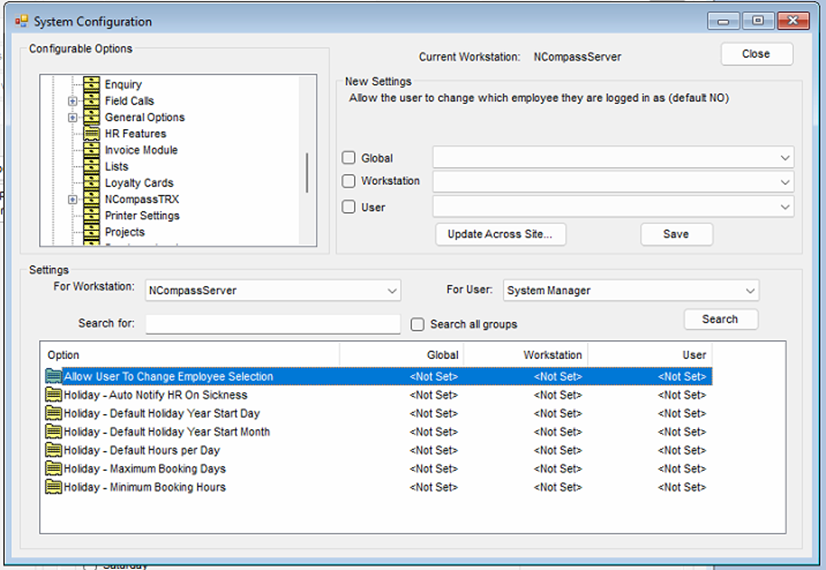
The following options can be set under system configuration.

[![image.png](https://kb.findesolutions.com/uploads/images/gallery/2026-04/scaled-1680-/zYzSHIz9SBsINSAy-image.png)](https://kb.findesolutions.com/uploads/images/gallery/2026-04/zYzSHIz9SBsINSAy-image.png)
<span style="mso-no-proof: yes;"> </span>

<span style="font-family: Wingdings; mso-fareast-font-family: Wingdings; mso-bidi-font-family: Wingdings;"><span style="mso-list: Ignore;">§<span style="font: 7.0pt 'Times New Roman';"> </span></span></span>Allow Users to Change Employee Selections – this is defaulted to ‘No’, this prevents users from looking at other employees’ requests, its recommended that you lock you salesperson to the user login.

<span style="font-family: Wingdings; mso-fareast-font-family: Wingdings; mso-bidi-font-family: Wingdings;"><span style="mso-list: Ignore;">§<span style="font: 7.0pt 'Times New Roman';"> </span></span></span>Holiday – Auto Notify HR on Sickness – this will email all staff marked in a HR roll automatically to make them aware of the sickness leave.

<span style="font-family: Wingdings; mso-fareast-font-family: Wingdings; mso-bidi-font-family: Wingdings;"><span style="mso-list: Ignore;">§<span style="font: 7.0pt 'Times New Roman';"> </span></span></span>Holiday – Holiday Year Start Date – this sets the start date of your 12-month holiday period, it defaults to 1<sup>st.</sup><span style="mso-spacerun: yes;"> </span>

<span style="font-family: Wingdings; mso-fareast-font-family: Wingdings; mso-bidi-font-family: Wingdings;"><span style="mso-list: Ignore;">§<span style="font: 7.0pt 'Times New Roman';"> </span></span></span>Holiday – Holiday Year Start Month - this sets the start Month of your 12-month holiday period, it defaults to January.

<span style="font-family: Wingdings; mso-fareast-font-family: Wingdings; mso-bidi-font-family: Wingdings;"><span style="mso-list: Ignore;">§<span style="font: 7.0pt 'Times New Roman';"> </span></span></span>Holiday – Default hours per day – this is set to a default of 8.5 hours

<span style="font-family: Wingdings; mso-fareast-font-family: Wingdings; mso-bidi-font-family: Wingdings;"><span style="mso-list: Ignore;">§<span style="font: 7.0pt 'Times New Roman';"> </span></span></span>Holiday – Maximum booking days – this is the maximum a employee can book as a single block, defaults to 28 days

<span style="font-family: Wingdings; mso-fareast-font-family: Wingdings; mso-bidi-font-family: Wingdings;"><span style="mso-list: Ignore;">§<span style="font: 7.0pt 'Times New Roman';"> </span></span></span>Holiday – Minimum booking Hours – the minimum time of request

<a name="_Toc226642015"></a>Staff Setup

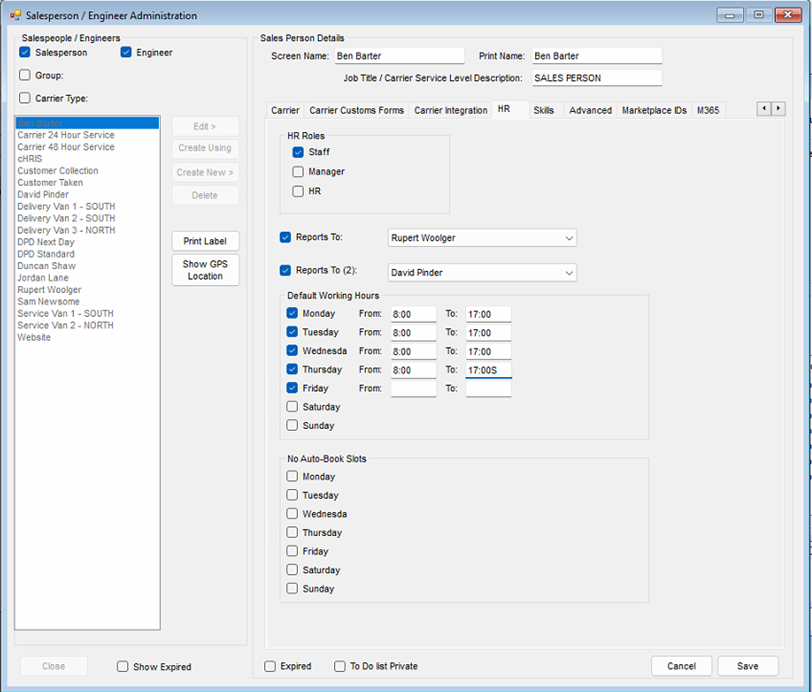
For each member of staff, you will need to set up the following.

<span style="font-family: Wingdings; mso-fareast-font-family: Wingdings; mso-bidi-font-family: Wingdings;"><span style="mso-list: Ignore;">§<span style="font: 7.0pt 'Times New Roman';"> </span></span></span>HR role

<span style="font-family: Wingdings; mso-fareast-font-family: Wingdings; mso-bidi-font-family: Wingdings;"><span style="mso-list: Ignore;">§<span style="font: 7.0pt 'Times New Roman';"> </span></span></span>Who they report to directly (manager / Line manager)

<span style="font-family: Wingdings; mso-fareast-font-family: Wingdings; mso-bidi-font-family: Wingdings;"><span style="mso-list: Ignore;">§<span style="font: 7.0pt 'Times New Roman';"> </span></span></span>Their backup manager

<span style="font-family: Wingdings; mso-fareast-font-family: Wingdings; mso-bidi-font-family: Wingdings;"><span style="mso-list: Ignore;">§<span style="font: 7.0pt 'Times New Roman';"> </span></span></span>Default working hours.

Administration &gt; Salespersons Engineers &gt; Edit

[![image.png](https://kb.findesolutions.com/uploads/images/gallery/2026-04/scaled-1680-/IyDsJXuo8WkjvVDe-image.png)](https://kb.findesolutions.com/uploads/images/gallery/2026-04/IyDsJXuo8WkjvVDe-image.png)

<span style="mso-no-proof: yes;"> </span>

<span style="font-family: Symbol; mso-fareast-font-family: Symbol; mso-bidi-font-family: Symbol;"><span style="mso-list: Ignore;">·<span style="font: 7.0pt 'Times New Roman';"> </span></span></span>Set the HR roles.

<span style="font-family: Wingdings; mso-fareast-font-family: Wingdings; mso-bidi-font-family: Wingdings;"><span style="mso-list: Ignore;">§<span style="font: 7.0pt 'Times New Roman';"> </span></span></span>All employees must be marked as Staff to be include in the HR system.

<span style="font-family: Wingdings; mso-fareast-font-family: Wingdings; mso-bidi-font-family: Wingdings;"><span style="mso-list: Ignore;">§<span style="font: 7.0pt 'Times New Roman';"> </span></span></span>Managers that need to approve staff requests should be marked as managers.

<span style="font-family: Wingdings; mso-fareast-font-family: Wingdings; mso-bidi-font-family: Wingdings;"><span style="mso-list: Ignore;">§<span style="font: 7.0pt 'Times New Roman';"> </span></span></span>At least one member of staff must have an HR role.

Rules are applied by cost centre, so you will need to ensure that each employee is in the correct cost centre.

<span style="font-family: Symbol; mso-fareast-font-family: Symbol; mso-bidi-font-family: Symbol;"><span style="mso-list: Ignore;">·<span style="font: 7.0pt 'Times New Roman';"> </span></span></span>Click on the ‘Contacts / Settings tag’

<span style="font-family: Symbol; mso-fareast-font-family: Symbol; mso-bidi-font-family: Symbol;"><span style="mso-list: Ignore;">·<span style="font: 7.0pt 'Times New Roman';"> </span></span></span>Click ‘Edit’ (if not already in editing mode)

<span style="font-family: Symbol; mso-fareast-font-family: Symbol; mso-bidi-font-family: Symbol;"><span style="mso-list: Ignore;">·<span style="font: 7.0pt 'Times New Roman';"> </span></span></span>Select the correct cost centre from the dropdown list

<span style="font-family: Symbol; mso-fareast-font-family: Symbol; mso-bidi-font-family: Symbol;"><span style="mso-list: Ignore;">·<span style="font: 7.0pt 'Times New Roman';"> </span></span></span>Click ‘Save’

You can Manage cost centres from

Administration &gt; Accounting &gt; Cost Centres

<a name="_Toc226642016"></a>Setting up HR Rules and entitlements

You should now setup the following:

<span style="font-family: Wingdings; mso-fareast-font-family: Wingdings; mso-bidi-font-family: Wingdings;"><span style="mso-list: Ignore;">§<span style="font: 7.0pt 'Times New Roman';"> </span></span></span>Absence types – List of reason for absence

<span style="font-family: Wingdings; mso-fareast-font-family: Wingdings; mso-bidi-font-family: Wingdings;"><span style="mso-list: Ignore;">§<span style="font: 7.0pt 'Times New Roman';"> </span></span></span>Blackout Dates – dates that holidays are blocked

<span style="font-family: Wingdings; mso-fareast-font-family: Wingdings; mso-bidi-font-family: Wingdings;"><span style="mso-list: Ignore;">§<span style="font: 7.0pt 'Times New Roman';"> </span></span></span>Conflict Rules – allowing you to limit the number of staff off in a cost centre

<span style="font-family: Wingdings; mso-fareast-font-family: Wingdings; mso-bidi-font-family: Wingdings;"><span style="mso-list: Ignore;">§<span style="font: 7.0pt 'Times New Roman';"> </span></span></span>Holiday Entitlement – set the default entitlement for each staff member

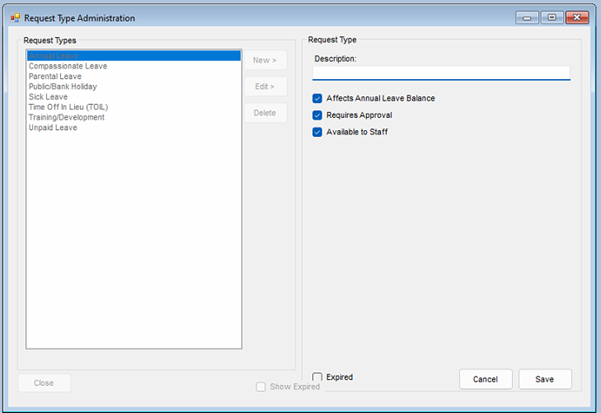
<a name="_Toc226642017"></a>Setting the Absence Types

Administration &gt; HR Manage Absence Types

[![image.png](https://kb.findesolutions.com/uploads/images/gallery/2026-04/scaled-1680-/OjOs65JHa2UCKZss-image.png)](https://kb.findesolutions.com/uploads/images/gallery/2026-04/OjOs65JHa2UCKZss-image.png)

<span style="mso-no-proof: yes;"> </span>

There is a of standard Absence types you can edit or add to

For each absence type check the relevant option

<span style="font-family: Wingdings; mso-fareast-font-family: Wingdings; mso-bidi-font-family: Wingdings;"><span style="mso-list: Ignore;">§<span style="font: 7.0pt 'Times New Roman';"> </span></span></span>Affects Annual Leave

<span style="font-family: Wingdings; mso-fareast-font-family: Wingdings; mso-bidi-font-family: Wingdings;"><span style="mso-list: Ignore;">§<span style="font: 7.0pt 'Times New Roman';"> </span></span></span>Requires Approval

<span style="font-family: Wingdings; mso-fareast-font-family: Wingdings; mso-bidi-font-family: Wingdings;"><span style="mso-list: Ignore;">§<span style="font: 7.0pt 'Times New Roman';"> </span></span></span>Available to Staff – this needs to be checked for staff to be able to request this type of leave

<a name="_Toc226642018"></a>Setting Blackouts

Administration &gt; HR &gt; Manage Blackout Dates

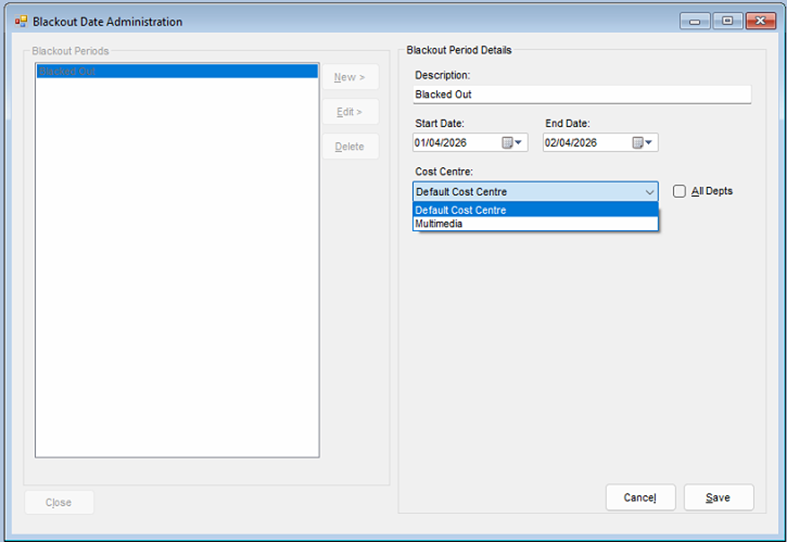
Blackouts lets you set date ranges when no holiday should be booked, any member of staff that is in the cost centre to which the blackout applies will be warned at the point of booking annual leave that the dates are not available.

[![image.png](https://kb.findesolutions.com/uploads/images/gallery/2026-04/scaled-1680-/ZUXgxgA6mJZvzCG1-image.png)](https://kb.findesolutions.com/uploads/images/gallery/2026-04/ZUXgxgA6mJZvzCG1-image.png)
<span style="mso-no-proof: yes;"> </span>

<span style="font-family: Wingdings; mso-fareast-font-family: Wingdings; mso-bidi-font-family: Wingdings;"><span style="mso-list: Ignore;">§<span style="font: 7.0pt 'Times New Roman';"> </span></span></span>Click ‘New’ or select an existing blackout and click ‘Edit’.

<span style="font-family: Wingdings; mso-fareast-font-family: Wingdings; mso-bidi-font-family: Wingdings;"><span style="mso-list: Ignore;">§<span style="font: 7.0pt 'Times New Roman';"> </span></span></span>Enter a description for this Blackout.

<span style="font-family: Wingdings; mso-fareast-font-family: Wingdings; mso-bidi-font-family: Wingdings;"><span style="mso-list: Ignore;">§<span style="font: 7.0pt 'Times New Roman';"> </span></span></span>Set the start and end date.

<span style="font-family: Wingdings; mso-fareast-font-family: Wingdings; mso-bidi-font-family: Wingdings;"><span style="mso-list: Ignore;">§<span style="font: 7.0pt 'Times New Roman';"> </span></span></span>By default the blackout will be for all departments (cost centres), if this entry only applies to a specific cost centre, uncheck the ‘All Depts’ checkbox, you will then be able to select a specific cost centre

<span style="font-family: Wingdings; mso-fareast-font-family: Wingdings; mso-bidi-font-family: Wingdings;"><span style="mso-list: Ignore;">§<span style="font: 7.0pt 'Times New Roman';"> </span></span></span>Click ‘Save’

### <a name="_Toc226642019"></a>Setting Conflict rules

Administration &gt; HR &gt; Manage Conflict Rules

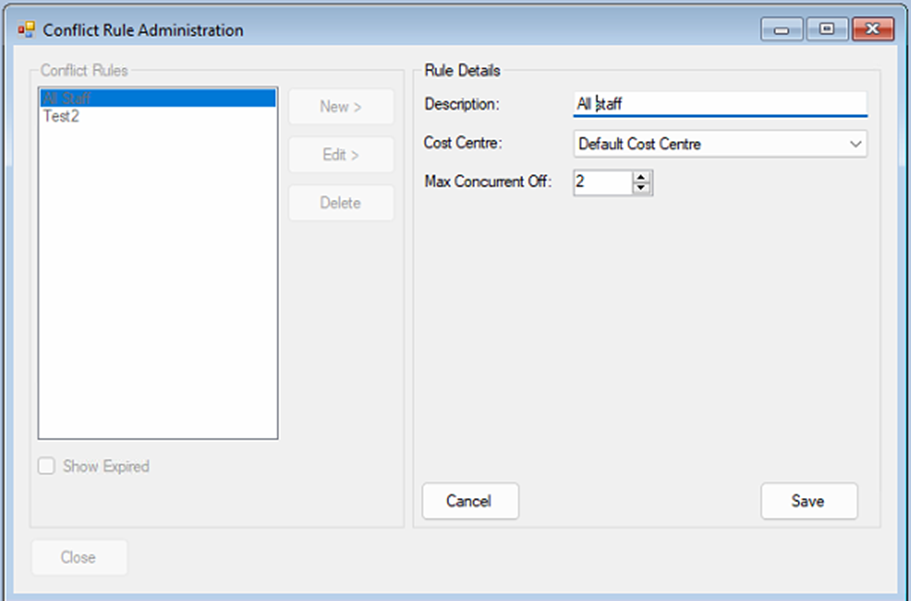
Conflict rules allow you to set the maximum number of staff that can be absent at any one time for that a cost centre

[![image.png](https://kb.findesolutions.com/uploads/images/gallery/2026-04/scaled-1680-/5MZzMWDlMLMWnZLY-image.png)](https://kb.findesolutions.com/uploads/images/gallery/2026-04/5MZzMWDlMLMWnZLY-image.png)
<span style="mso-no-proof: yes;"> </span>

<span style="font-family: Wingdings; mso-fareast-font-family: Wingdings; mso-bidi-font-family: Wingdings;"><span style="mso-list: Ignore;">§<span style="font: 7.0pt 'Times New Roman';"> </span></span></span>Click ‘New’ or select an existing conflict entry and click ‘Edit’.

<span style="font-family: Wingdings; mso-fareast-font-family: Wingdings; mso-bidi-font-family: Wingdings;"><span style="mso-list: Ignore;">§<span style="font: 7.0pt 'Times New Roman';"> </span></span></span>Enter a description for this conflict.

<span style="font-family: Wingdings; mso-fareast-font-family: Wingdings; mso-bidi-font-family: Wingdings;"><span style="mso-list: Ignore;">§<span style="font: 7.0pt 'Times New Roman';"> </span></span></span>Set the cost centre from the drop-down list.

<span style="font-family: Wingdings; mso-fareast-font-family: Wingdings; mso-bidi-font-family: Wingdings;"><span style="mso-list: Ignore;">§<span style="font: 7.0pt 'Times New Roman';"> </span></span></span>Set the total number of staff for this cost centre conflict rule.

<span style="font-family: Wingdings; mso-fareast-font-family: Wingdings; mso-bidi-font-family: Wingdings;"><span style="mso-list: Ignore;">§<span style="font: 7.0pt 'Times New Roman';"> </span></span></span>Click ‘Save’

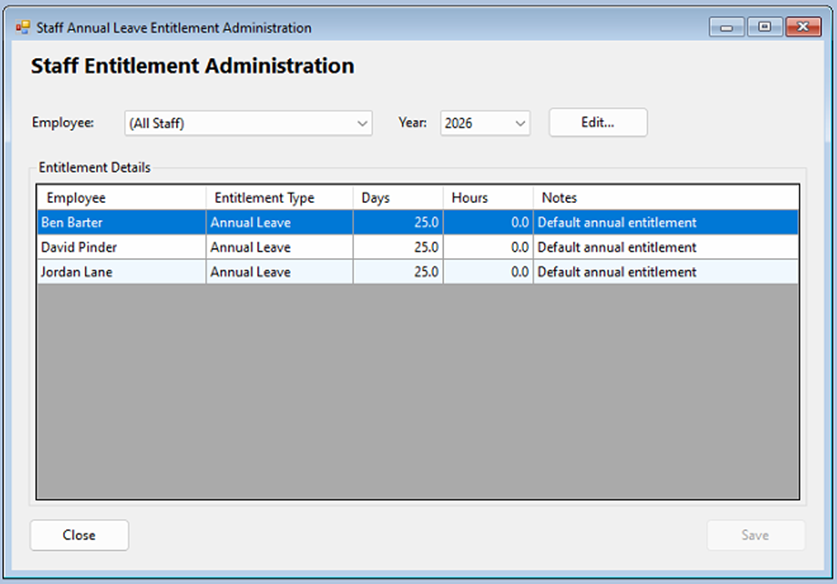
### <a name="_Toc226642020"></a>Setting Staff Holiday Entitlements

Administration &gt; HR &gt; Manage Entitlements

[![image.png](https://kb.findesolutions.com/uploads/images/gallery/2026-04/scaled-1680-/I039Swq10XkHVHyd-image.png)](https://kb.findesolutions.com/uploads/images/gallery/2026-04/I039Swq10XkHVHyd-image.png)

<span style="mso-no-proof: yes;"> </span>

Your employees will initially have the default entitlement, to change.

<span style="font-family: Wingdings; mso-fareast-font-family: Wingdings; mso-bidi-font-family: Wingdings;"><span style="mso-list: Ignore;">§<span style="font: 7.0pt 'Times New Roman';"> </span></span></span>Click ‘Edit’

<span style="font-family: Wingdings; mso-fareast-font-family: Wingdings; mso-bidi-font-family: Wingdings;"><span style="mso-list: Ignore;">§<span style="font: 7.0pt 'Times New Roman';"> </span></span></span>Click into any of the Cells for any Employee and make your adjustments.

<span style="font-family: Wingdings; mso-fareast-font-family: Wingdings; mso-bidi-font-family: Wingdings;"><span style="mso-list: Ignore;">§<span style="font: 7.0pt 'Times New Roman';"> </span></span></span>Click ‘Save’

<span style="mso-no-proof: yes;"> </span>

[![image.png](https://kb.findesolutions.com/uploads/images/gallery/2026-04/scaled-1680-/WCuVwGmmk4KinitG-image.png)](https://kb.findesolutions.com/uploads/images/gallery/2026-04/WCuVwGmmk4KinitG-image.png)

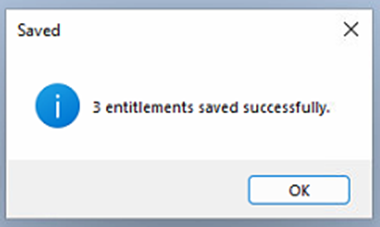
All entries in the grid will be updated.

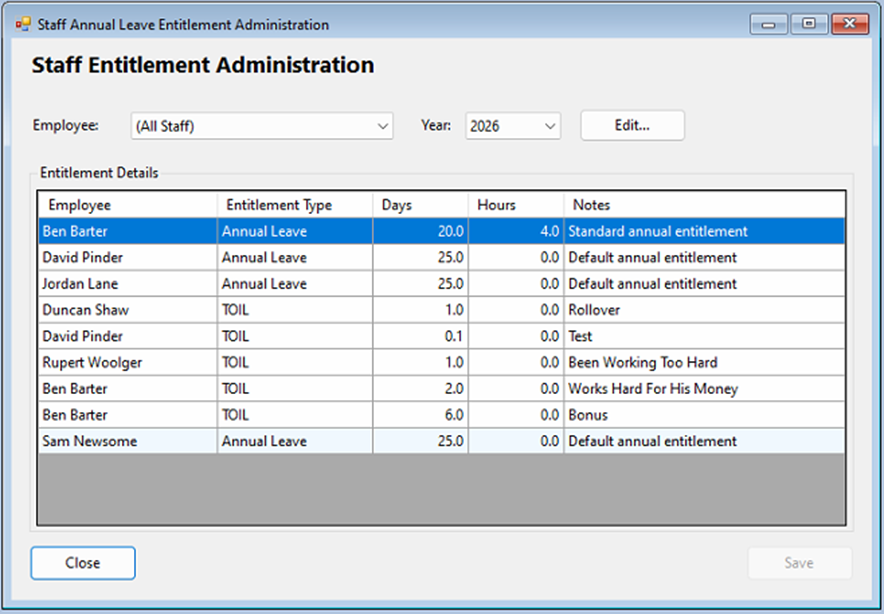
The entitlement screen will also show any additional time added in addition to the staff member’s annual leave.

[![image.png](https://kb.findesolutions.com/uploads/images/gallery/2026-04/scaled-1680-/2MlicnrNKOfp8uw2-image.png)](https://kb.findesolutions.com/uploads/images/gallery/2026-04/2MlicnrNKOfp8uw2-image.png)
**<span style="font-size: 16.0pt; font-family: 'Arial',sans-serif; color: blue; mso-font-kerning: 16.0pt;"> </span>**

# <a name="_Toc226642021"></a>Holidays

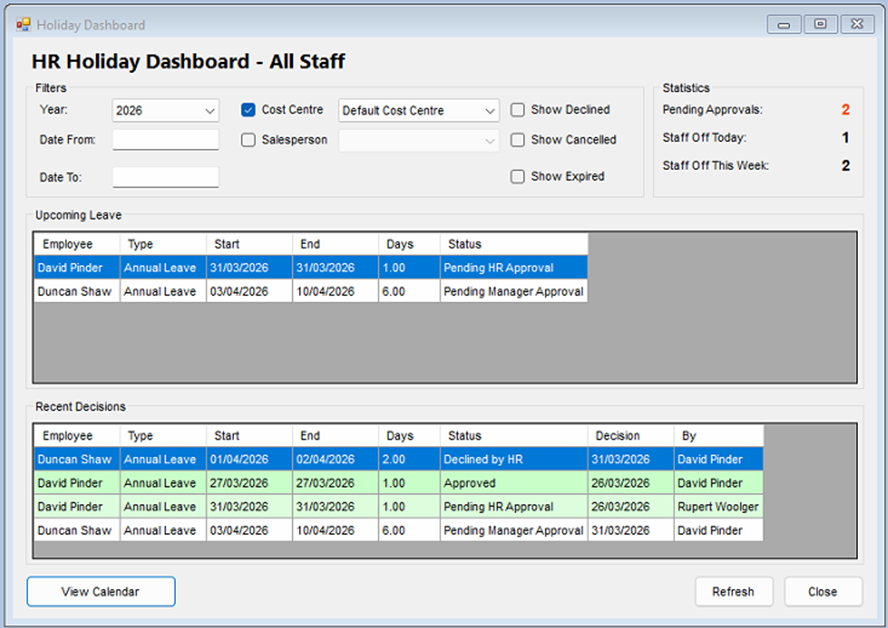
## <a name="_Toc226642022"></a>HR Dashboard – Holiday Overview

HR &gt; Holidays &gt; Dashboard/Overview

This screen allows staff to see all upcoming leave, pending requests and recent decisions.

**Note The view presented here will change depend in your job Role.**

<span style="font-family: Wingdings; mso-fareast-font-family: Wingdings; mso-bidi-font-family: Wingdings;"><span style="mso-list: Ignore;">Ø<span style="font: 7.0pt 'Times New Roman';"> </span></span></span>Staff – will only see their overview.

<span style="font-family: Wingdings; mso-fareast-font-family: Wingdings; mso-bidi-font-family: Wingdings;"><span style="mso-list: Ignore;">Ø<span style="font: 7.0pt 'Times New Roman';"> </span></span></span>Managers – will see entries for all staff that they manage.

<span style="font-family: Wingdings; mso-fareast-font-family: Wingdings; mso-bidi-font-family: Wingdings;"><span style="mso-list: Ignore;">Ø<span style="font: 7.0pt 'Times New Roman';"> </span></span></span>HR – will see all entries.

[![image.png](https://kb.findesolutions.com/uploads/images/gallery/2026-04/scaled-1680-/YnCwKmAftz1zsbLp-image.png)](https://kb.findesolutions.com/uploads/images/gallery/2026-04/YnCwKmAftz1zsbLp-image.png)

<span style="mso-no-proof: yes;"> </span>

The dashboard can be filtered by

<span style="font-family: Wingdings; mso-fareast-font-family: Wingdings; mso-bidi-font-family: Wingdings;"><span style="mso-list: Ignore;">§<span style="font: 7.0pt 'Times New Roman';"> </span></span></span>Year

<span style="font-family: Wingdings; mso-fareast-font-family: Wingdings; mso-bidi-font-family: Wingdings;"><span style="mso-list: Ignore;">§<span style="font: 7.0pt 'Times New Roman';"> </span></span></span>Date from

<span style="font-family: Wingdings; mso-fareast-font-family: Wingdings; mso-bidi-font-family: Wingdings;"><span style="mso-list: Ignore;">§<span style="font: 7.0pt 'Times New Roman';"> </span></span></span>Date to

<span style="font-family: Wingdings; mso-fareast-font-family: Wingdings; mso-bidi-font-family: Wingdings;"><span style="mso-list: Ignore;">§<span style="font: 7.0pt 'Times New Roman';"> </span></span></span>Salesperson

<span style="font-family: Wingdings; mso-fareast-font-family: Wingdings; mso-bidi-font-family: Wingdings;"><span style="mso-list: Ignore;">§<span style="font: 7.0pt 'Times New Roman';"> </span></span></span>Cost Centre

You can hide or show.

<span style="font-family: Wingdings; mso-fareast-font-family: Wingdings; mso-bidi-font-family: Wingdings;"><span style="mso-list: Ignore;">§<span style="font: 7.0pt 'Times New Roman';"> </span></span></span>Declined Requests

<span style="font-family: Wingdings; mso-fareast-font-family: Wingdings; mso-bidi-font-family: Wingdings;"><span style="mso-list: Ignore;">§<span style="font: 7.0pt 'Times New Roman';"> </span></span></span>Cancelled Requests

<span style="font-family: Wingdings; mso-fareast-font-family: Wingdings; mso-bidi-font-family: Wingdings;"><span style="mso-list: Ignore;">§<span style="font: 7.0pt 'Times New Roman';"> </span></span></span>Expired Requests

You will only be able to see the HR Dashboard if you are tagged as a member of the HR

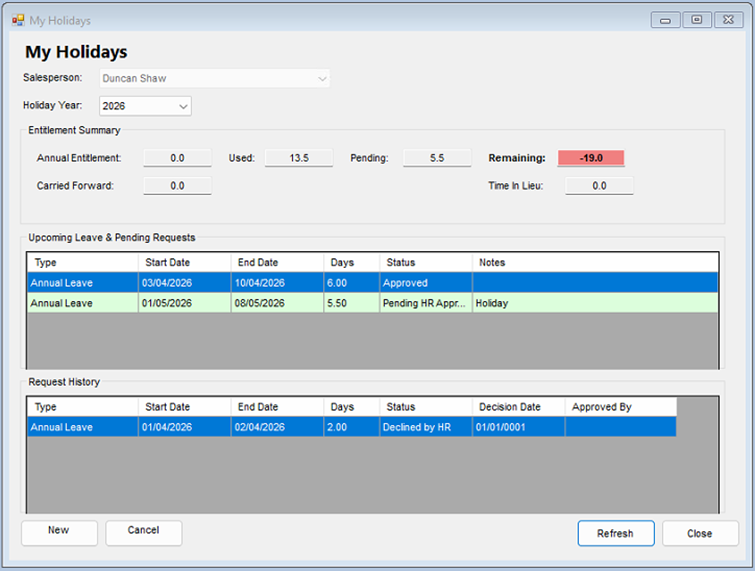
## <a name="_Toc226642023"></a>View your holidays and requests

HR &gt; Holidays My Holiday Entitlement /View

This will show you all your holiday Requests and approvals, along with your free and used entitlement.

<span style="mso-no-proof: yes;"> </span>

[![image.png](https://kb.findesolutions.com/uploads/images/gallery/2026-04/scaled-1680-/fnlqwXZ0MnCC2uPJ-image.png)](https://kb.findesolutions.com/uploads/images/gallery/2026-04/fnlqwXZ0MnCC2uPJ-image.png)

Note: your requests may need approval by both your line manager and HR before its fully approved

<span style="mso-no-proof: yes;"> </span>

[![image.png](https://kb.findesolutions.com/uploads/images/gallery/2026-04/scaled-1680-/4Moc69zdg5zcwgQT-image.png)](https://kb.findesolutions.com/uploads/images/gallery/2026-04/4Moc69zdg5zcwgQT-image.png)

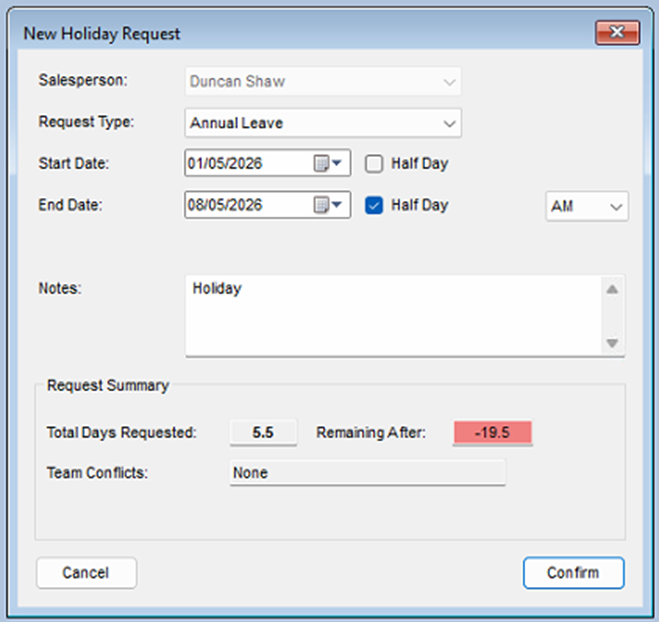
### <a name="_Toc226642024"></a>Requesting Time Off

HR &gt; Holidays &gt; Submit new Request

[![image.png](https://kb.findesolutions.com/uploads/images/gallery/2026-04/scaled-1680-/FhonU8Y65Ou3HB1U-image.png)](https://kb.findesolutions.com/uploads/images/gallery/2026-04/FhonU8Y65Ou3HB1U-image.png)

<span style="mso-no-proof: yes;"> </span>

<span style="font-family: Symbol; mso-fareast-font-family: Symbol; mso-bidi-font-family: Symbol;"><span style="mso-list: Ignore;">·<span style="font: 7.0pt 'Times New Roman';"> </span></span></span>Select the request type from the drop-down list (annual leave)

<span style="font-family: Symbol; mso-fareast-font-family: Symbol; mso-bidi-font-family: Symbol;"><span style="mso-list: Ignore;">·<span style="font: 7.0pt 'Times New Roman';"> </span></span></span>Select the start date of your leave request.

<span style="font-family: Symbol; mso-fareast-font-family: Symbol; mso-bidi-font-family: Symbol;"><span style="mso-list: Ignore;">·<span style="font: 7.0pt 'Times New Roman';"> </span></span></span>Select the last day of your leave request.

Note: you can select half days by clicking the half day check box, select AM or PM for the Half Day

It will calculate the number of days requested based on your working days, as well as your entitlement, if your request clashes with other team members or a blackout day, this will be shown

<span style="font-family: Symbol; mso-fareast-font-family: Symbol; mso-bidi-font-family: Symbol;"><span style="mso-list: Ignore;">·<span style="font: 7.0pt 'Times New Roman';"> </span></span></span>Click Confirm

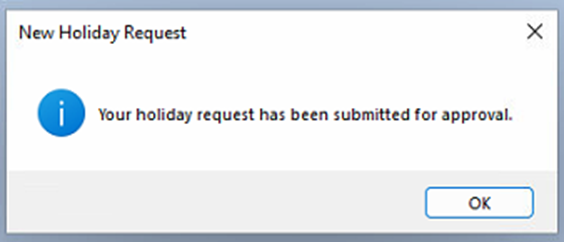
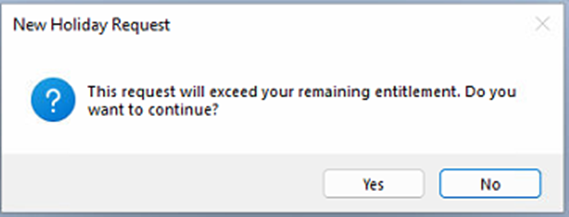
if your request does not clash, the request will be sent for approval. If it does clash the request can still be submitted, although it may not be approved, you will be asked if you want to continue

[![image.png](https://kb.findesolutions.com/uploads/images/gallery/2026-04/scaled-1680-/zL9sgU0jEqXPslyw-image.png)](https://kb.findesolutions.com/uploads/images/gallery/2026-04/zL9sgU0jEqXPslyw-image.png)
<span style="mso-no-proof: yes;"> </span>

[![image.png](https://kb.findesolutions.com/uploads/images/gallery/2026-04/scaled-1680-/vbECYaAmYGpFtzra-image.png)](https://kb.findesolutions.com/uploads/images/gallery/2026-04/vbECYaAmYGpFtzra-image.png)

<span style="mso-no-proof: yes;"> </span>

### <a name="_Toc226642025"></a>Approving Leave Requests

The normal process for approval is…

Staff Member Submits Request &gt;&gt; Manger Approves &gt;&gt; HR approves.

However, HR staff can directly Approve requests if required.

## <a name="_Toc226642026"></a>Manager Approval

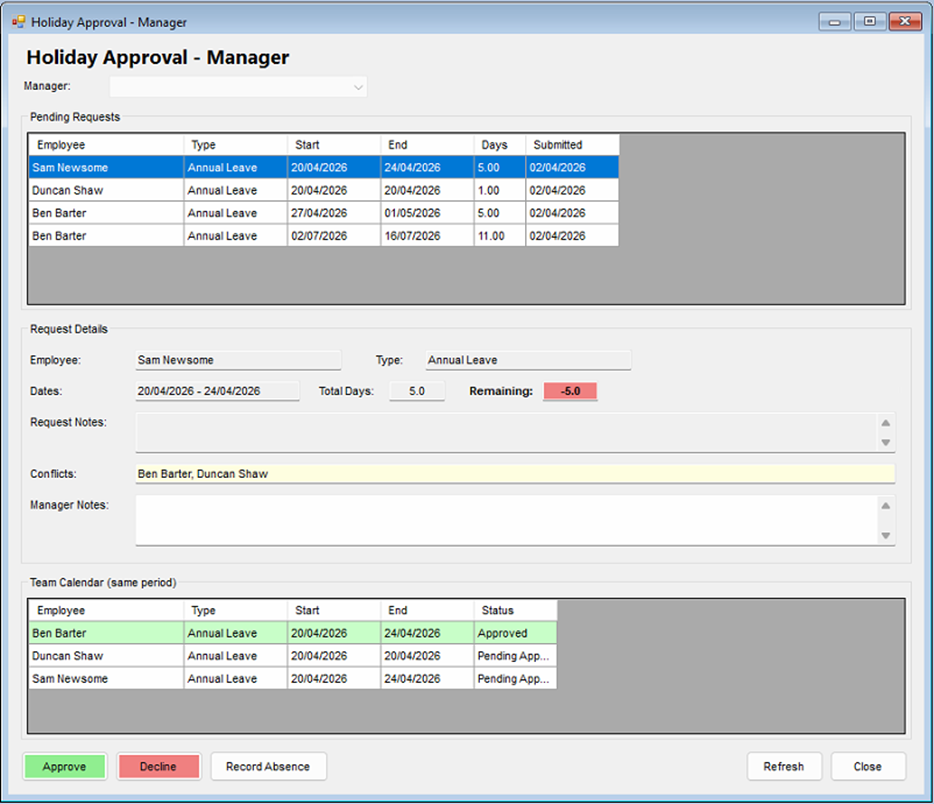
HR &gt;Holidays &gt; Managers Approval Queue

[![image.png](https://kb.findesolutions.com/uploads/images/gallery/2026-04/scaled-1680-/WCzOWBUu7ieCNmAs-image.png)](https://kb.findesolutions.com/uploads/images/gallery/2026-04/WCzOWBUu7ieCNmAs-image.png)

<span style="mso-no-proof: yes;"> </span>

You will see the pending requests for all the staff you manage.

<span style="font-family: Symbol; mso-fareast-font-family: Symbol; mso-bidi-font-family: Symbol;"><span style="mso-list: Ignore;">·<span style="font: 7.0pt 'Times New Roman';"> </span></span></span>Select one of the requests from this list.

The request details will be shown along with any notes and the remaining entitlement days.

### <a name="_Toc226642027"></a>Request Approval

<span style="font-family: Symbol; mso-fareast-font-family: Symbol; mso-bidi-font-family: Symbol;"><span style="mso-list: Ignore;">·<span style="font: 7.0pt 'Times New Roman';"> </span></span></span>Highlight the request you want to approve or decline.

the request details will update to show the leave type, requested dates, total days and the days the staff member has left after this approval.

<span style="font-family: Symbol; mso-fareast-font-family: Symbol; mso-bidi-font-family: Symbol;"><span style="mso-list: Ignore;">·<span style="font: 7.0pt 'Times New Roman';"> </span></span></span>Click Approve or Decline

## <a name="_Toc226642028"></a>HR Approval

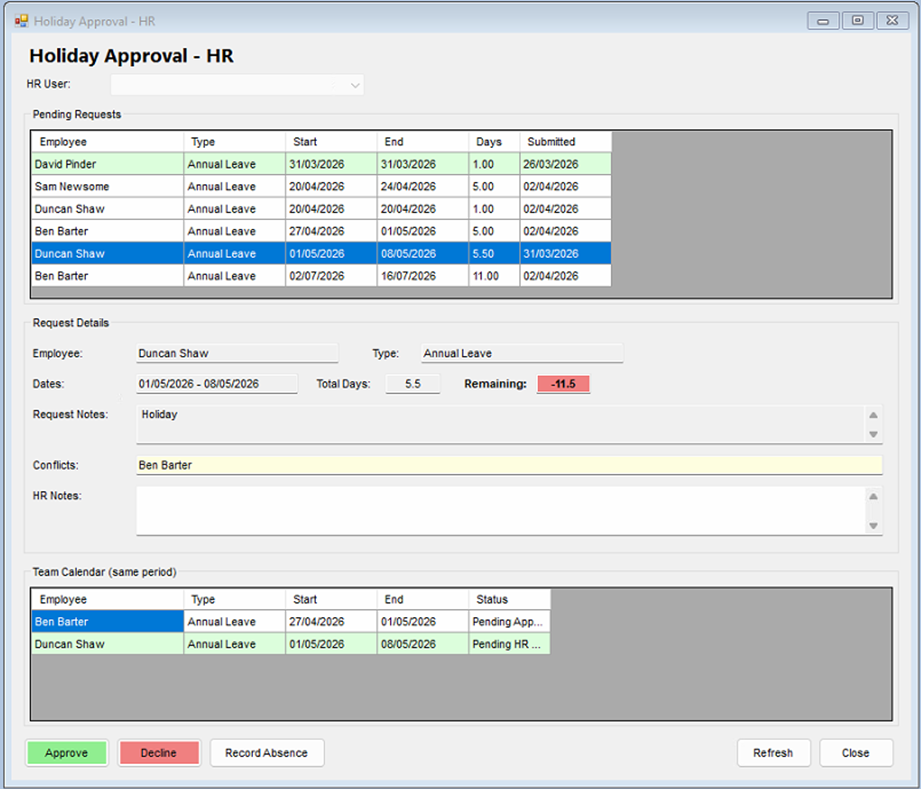
HR &gt;Holidays &gt; HR Approval Queue

<span style="mso-no-proof: yes;"> </span>

[![image.png](https://kb.findesolutions.com/uploads/images/gallery/2026-04/scaled-1680-/L3JzkuBU1XoFB7Jm-image.png)](https://kb.findesolutions.com/uploads/images/gallery/2026-04/L3JzkuBU1XoFB7Jm-image.png)

You will see the pending requests for all the staff.

<span style="font-family: Symbol; mso-fareast-font-family: Symbol; mso-bidi-font-family: Symbol;"><span style="mso-list: Ignore;">·<span style="font: 7.0pt 'Times New Roman';"> </span></span></span>Select one of the requests from this list.

The request details will be shown along with any notes and the remaining entitlement days.

**Request Approval**

<span style="font-family: Symbol; mso-fareast-font-family: Symbol; mso-bidi-font-family: Symbol;"><span style="mso-list: Ignore;">·<span style="font: 7.0pt 'Times New Roman';"> </span></span></span>Highlight the request you want to approve or decline.

the request details will update to show the leave type, requested dates, total days and the days the staff member has left after this approval.

<span style="font-family: Symbol; mso-fareast-font-family: Symbol; mso-bidi-font-family: Symbol;"><span style="mso-list: Ignore;">·<span style="font: 7.0pt 'Times New Roman';"> </span></span></span>Click Approve or Decline

## <a name="_Toc226642029"></a>Team Calander View

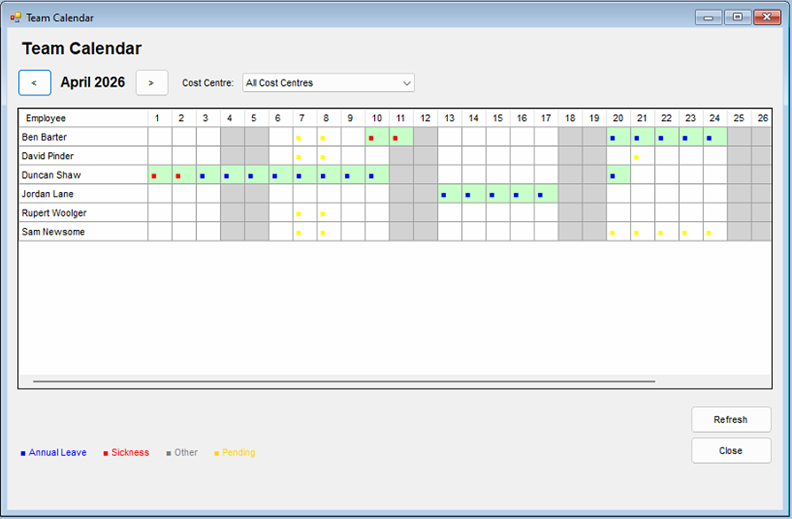
The team calendar view will allow you to see all annual leave, pending requests, Sick leave and any other absences in a monthly calendar grid.

<span style="mso-no-proof: yes;"> </span>

[![image.png](https://kb.findesolutions.com/uploads/images/gallery/2026-04/scaled-1680-/0GXOIh1sJ1LJMAc2-image.png)](https://kb.findesolutions.com/uploads/images/gallery/2026-04/0GXOIh1sJ1LJMAc2-image.png)

The left and right buttons will advance or retard the monthly view.

You can apply a cost centre filter from the drop down list.

The entries re colour coded as per the legend on screen.

<span style="font-family: Symbol; mso-fareast-font-family: Symbol; mso-bidi-font-family: Symbol;"><span style="mso-list: Ignore;">·<span style="font: 7.0pt 'Times New Roman';"> </span></span></span>Blue – Annual Leave

<span style="font-family: Symbol; mso-fareast-font-family: Symbol; mso-bidi-font-family: Symbol;"><span style="mso-list: Ignore;">·<span style="font: 7.0pt 'Times New Roman';"> </span></span></span>Red – Sickness

<span style="font-family: Symbol; mso-fareast-font-family: Symbol; mso-bidi-font-family: Symbol;"><span style="mso-list: Ignore;">·<span style="font: 7.0pt 'Times New Roman';"> </span></span></span>Grey – Other leave Types

<span style="font-family: Symbol; mso-fareast-font-family: Symbol; mso-bidi-font-family: Symbol;"><span style="mso-list: Ignore;">·<span style="font: 7.0pt 'Times New Roman';"> </span></span></span>Orange – Pending approvals.

## <a name="_Toc226642030"></a>Manage time off in Lieu.

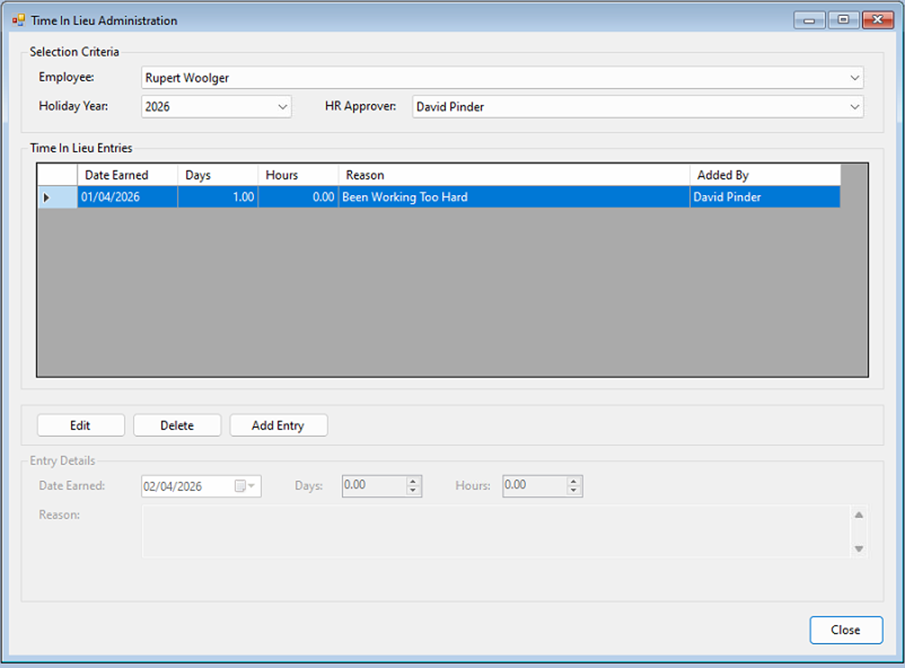
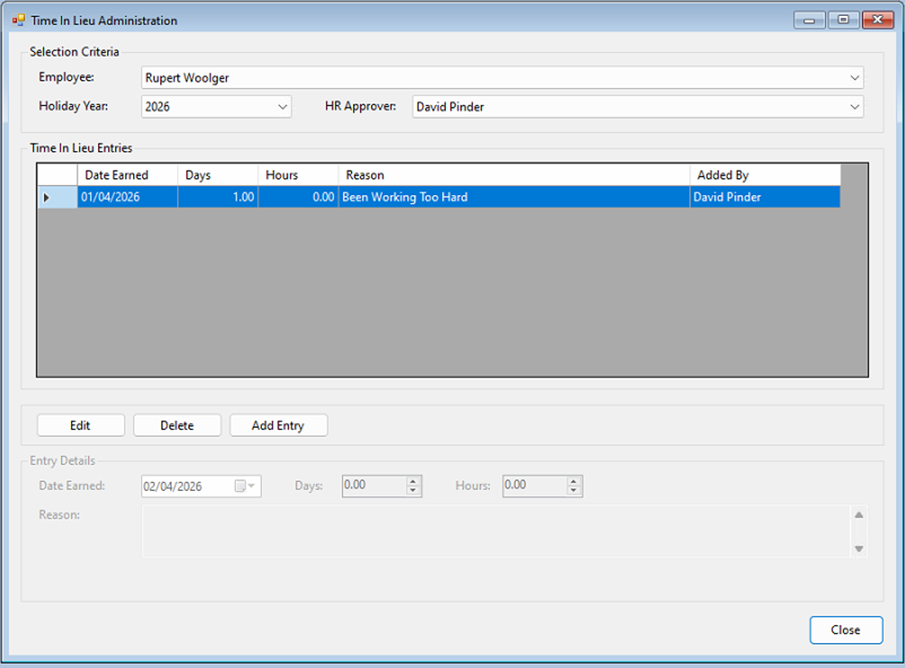
Time Off in Lieu can only be managed by HR staff.

HR &gt; Holidays &gt; Manage Time Off in Lieu

<span style="mso-no-proof: yes;"> </span>

[![image.png](https://kb.findesolutions.com/uploads/images/gallery/2026-04/scaled-1680-/mfrURYPxkLtprNG8-image.png)](https://kb.findesolutions.com/uploads/images/gallery/2026-04/mfrURYPxkLtprNG8-image.png)

Selecting the staff member from the drop-down list of employees will show all additional time off allowances that have already been added.

You can

### <a name="_Toc226642031"></a>Edit and existing entry.

<span style="font-family: Symbol; mso-fareast-font-family: Symbol; mso-bidi-font-family: Symbol;"><span style="mso-list: Ignore;">·<span style="font: 7.0pt 'Times New Roman';"> </span></span></span>Highlight the entry and click ‘Edit’.

<span style="font-family: Symbol; mso-fareast-font-family: Symbol; mso-bidi-font-family: Symbol;"><span style="mso-list: Ignore;">·<span style="font: 7.0pt 'Times New Roman';"> </span></span></span>Update the required information, date entered, days and hours.

<span style="font-family: Symbol; mso-fareast-font-family: Symbol; mso-bidi-font-family: Symbol;"><span style="mso-list: Ignore;">·<span style="font: 7.0pt 'Times New Roman';"> </span></span></span>Click ‘Save’

### <a name="_Toc226642032"></a>Delete an Entry

<span style="font-family: Symbol; mso-fareast-font-family: Symbol; mso-bidi-font-family: Symbol;"><span style="mso-list: Ignore;">·<span style="font: 7.0pt 'Times New Roman';"> </span></span></span>Highlight the entry and click ‘Delete’.

<span style="mso-no-proof: yes;"> </span>

[![image.png](https://kb.findesolutions.com/uploads/images/gallery/2026-04/scaled-1680-/c4E92xDRRwnJOuRx-image.png)](https://kb.findesolutions.com/uploads/images/gallery/2026-04/c4E92xDRRwnJOuRx-image.png)

You will be asked to confirm this deletion

### <a name="_Toc226642033"></a>Add a New Entry

- Click ‘Add Entry’
- Enter the number of days, and hours, the entry date will automatically set to the current date.
- Click ‘Save’
- 

## <a name="_Toc226642034"></a>Recording Absence not requested by Staff.

Both Manager and HR staff can record any type of absence, even if it has not been requested by a staff member

HR &gt; Holidays &gt; Managers Approval Queue

HR &gt; Holidays HR Approval Queue

At the bottom of both theses screens you will see a ‘Record Absence’ Buton

[![image.png](https://kb.findesolutions.com/uploads/images/gallery/2026-04/scaled-1680-/aQ5Yr4cWxlpdO166-image.png)](https://kb.findesolutions.com/uploads/images/gallery/2026-04/aQ5Yr4cWxlpdO166-image.png)

Click ‘Record Absence’

[![image.png](https://kb.findesolutions.com/uploads/images/gallery/2026-04/scaled-1680-/4gd95cGudcr51kVM-image.png)](https://kb.findesolutions.com/uploads/images/gallery/2026-04/4gd95cGudcr51kVM-image.png)
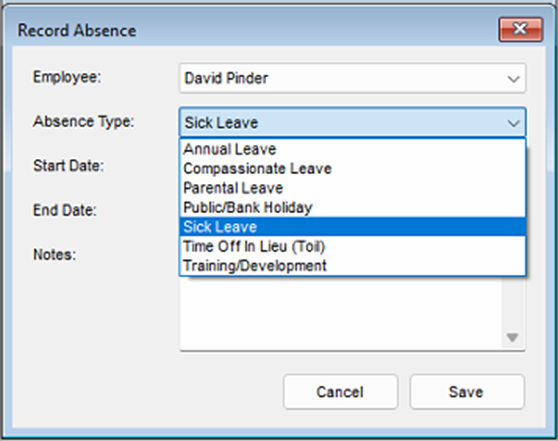
<span style="font-family: Symbol; mso-fareast-font-family: Symbol; mso-bidi-font-family: Symbol;"><span style="mso-list: Ignore;">·<span style="font: 7.0pt 'Times New Roman';"> </span></span></span>Select the Staff Member

<span style="font-family: Symbol; mso-fareast-font-family: Symbol; mso-bidi-font-family: Symbol;"><span style="mso-list: Ignore;">·<span style="font: 7.0pt 'Times New Roman';"> </span></span></span>Select the reason from the Absence type dropdown list.

<span style="font-family: Symbol; mso-fareast-font-family: Symbol; mso-bidi-font-family: Symbol;"><span style="mso-list: Ignore;">·<span style="font: 7.0pt 'Times New Roman';"> </span></span></span>Select the start date and end date.

<span style="font-family: Symbol; mso-fareast-font-family: Symbol; mso-bidi-font-family: Symbol;"><span style="mso-list: Ignore;">·<span style="font: 7.0pt 'Times New Roman';"> </span></span></span>Add any notes.

<span style="font-family: Symbol; mso-fareast-font-family: Symbol; mso-bidi-font-family: Symbol;"><span style="mso-list: Ignore;">·<span style="font: 7.0pt 'Times New Roman';"> </span></span></span>Click Save

The Absence still need to be approved by Mangers and HR

# <a name="_Toc226642035"></a>Overtime

## <a name="_Toc226642036"></a>My Overtime Requests


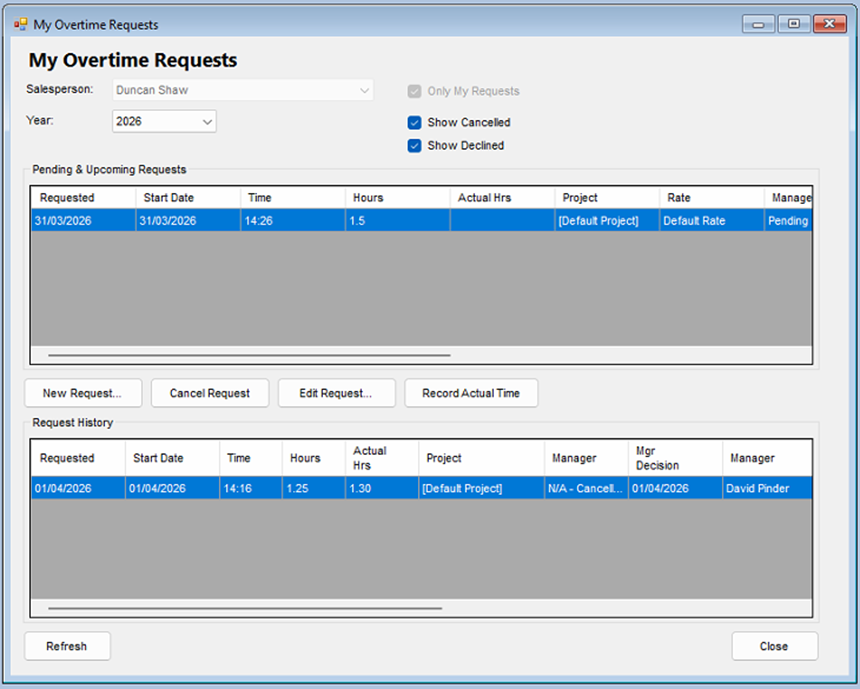
HR &gt; Overtime &gt; My Overtime View

<span style="mso-no-proof: yes;"> </span>

[![image.png](https://kb.findesolutions.com/uploads/images/gallery/2026-04/scaled-1680-/YPiEWuaXnnywfAzE-image.png)](https://kb.findesolutions.com/uploads/images/gallery/2026-04/YPiEWuaXnnywfAzE-image.png)

This will show you all your overtime requests and your request history.


### <a name="_Toc226642037"></a>New Overtime Request

Click the ‘New Request’ button.

[![image.png](https://kb.findesolutions.com/uploads/images/gallery/2026-04/scaled-1680-/Ws4YKsCfn3RhzZKZ-image.png)](https://kb.findesolutions.com/uploads/images/gallery/2026-04/Ws4YKsCfn3RhzZKZ-image.png)
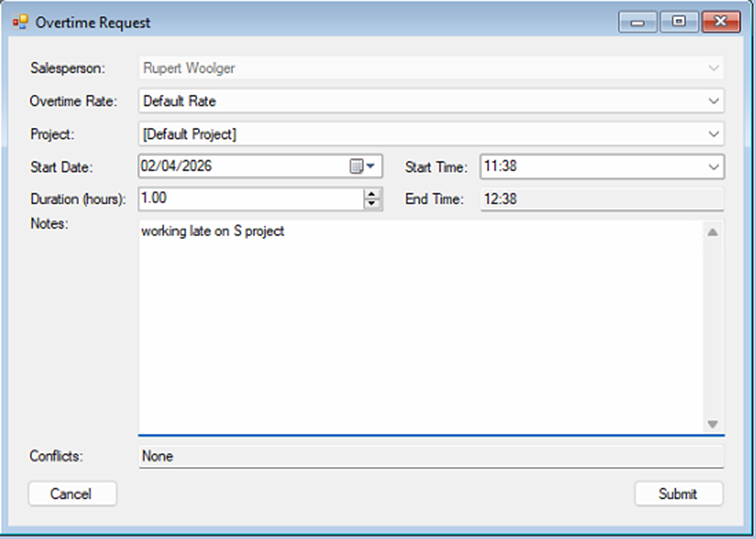
Your Name will be pre-selected.

Update the request with the following information.

<span style="font-family: Wingdings; mso-fareast-font-family: Wingdings; mso-bidi-font-family: Wingdings;"><span style="mso-list: Ignore;">§<span style="font: 7.0pt 'Times New Roman';"> </span></span></span>Overtime rate – if your organisation has more than one rate, please select it from the dropdown list.

<span style="font-family: Wingdings; mso-fareast-font-family: Wingdings; mso-bidi-font-family: Wingdings;"><span style="mso-list: Ignore;">§<span style="font: 7.0pt 'Times New Roman';"> </span></span></span>Project – if you use NCompass Project Tracking, select the project, if not leave it set to default

<span style="font-family: Wingdings; mso-fareast-font-family: Wingdings; mso-bidi-font-family: Wingdings;"><span style="mso-list: Ignore;">§<span style="font: 7.0pt 'Times New Roman';"> </span></span></span>Enter the start date and time.

<span style="font-family: Wingdings; mso-fareast-font-family: Wingdings; mso-bidi-font-family: Wingdings;"><span style="mso-list: Ignore;">§<span style="font: 7.0pt 'Times New Roman';"> </span></span></span>Enter the duration of the overtime- the end time will be calculated automatically.

<span style="font-family: Wingdings; mso-fareast-font-family: Wingdings; mso-bidi-font-family: Wingdings;"><span style="mso-list: Ignore;">§<span style="font: 7.0pt 'Times New Roman';"> </span></span></span>Add any notes.

<span style="font-family: Symbol; mso-fareast-font-family: Symbol; mso-bidi-font-family: Symbol;"><span style="mso-list: Ignore;">·<span style="font: 7.0pt 'Times New Roman';"> </span></span></span>Click ‘Submit’

Your request will be submitted for approval by your manager or the HR Team

### <a name="_Toc226642038"></a>Cancel Request

<span style="font-family: Symbol; mso-fareast-font-family: Symbol; mso-bidi-font-family: Symbol;"><span style="mso-list: Ignore;">·<span style="font: 7.0pt 'Times New Roman';"> </span></span></span>Highlight the request you want to cancel.

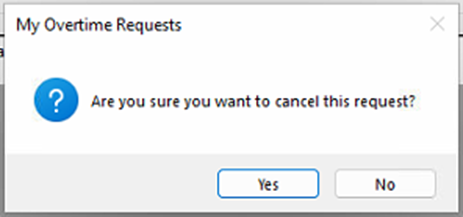
<span style="font-family: Symbol; mso-fareast-font-family: Symbol; mso-bidi-font-family: Symbol;"><span style="mso-list: Ignore;">·<span style="font: 7.0pt 'Times New Roman';"> </span></span></span>Click the ‘Cancel Request' button.

[![image.png](https://kb.findesolutions.com/uploads/images/gallery/2026-04/scaled-1680-/qSldGM5qhj9borZW-image.png)](https://kb.findesolutions.com/uploads/images/gallery/2026-04/qSldGM5qhj9borZW-image.png)

- Confirm the cancellation.

<span style="mso-no-proof: yes;"> </span>

### <a name="_Toc226642039"></a>Edit Request

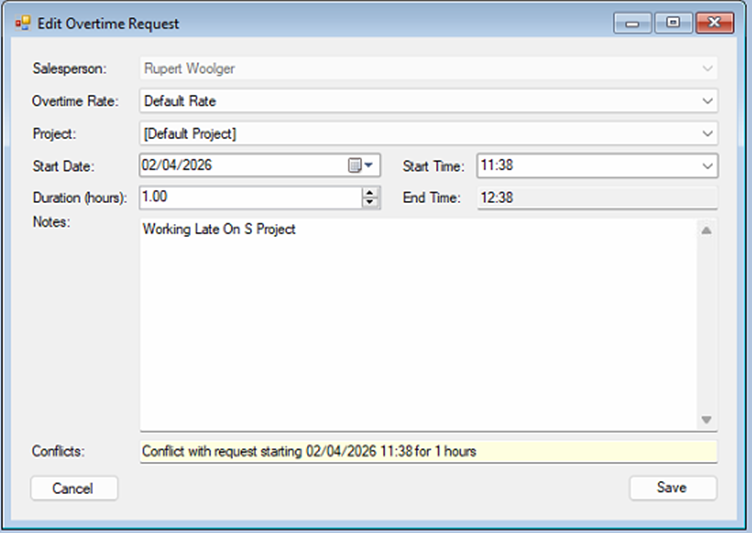
<span style="font-family: Symbol; mso-fareast-font-family: Symbol; mso-bidi-font-family: Symbol;"><span style="mso-list: Ignore;">·<span style="font: 7.0pt 'Times New Roman';"> </span></span></span>Highlight the request you want to Edit.

<span style="font-family: Symbol; mso-fareast-font-family: Symbol; mso-bidi-font-family: Symbol;"><span style="mso-list: Ignore;">·<span style="font: 7.0pt 'Times New Roman';"> </span></span></span>Click the ‘Edit Request' button.

<span style="mso-no-proof: yes;"> </span>

[![image.png](https://kb.findesolutions.com/uploads/images/gallery/2026-04/scaled-1680-/wx9QIvW5NZGqu6Sm-image.png)](https://kb.findesolutions.com/uploads/images/gallery/2026-04/wx9QIvW5NZGqu6Sm-image.png)

<span style="font-family: Symbol; mso-fareast-font-family: Symbol; mso-bidi-font-family: Symbol;"><span style="mso-list: Ignore;">·<span style="font: 7.0pt 'Times New Roman';"> </span></span></span>Update the request details.

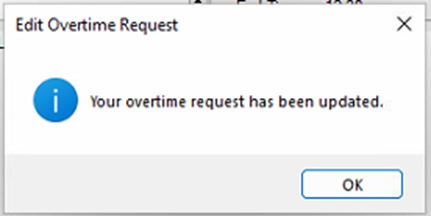
<span style="font-family: Symbol; mso-fareast-font-family: Symbol; mso-bidi-font-family: Symbol;"><span style="mso-list: Ignore;">·<span style="font: 7.0pt 'Times New Roman';"> </span></span></span>Click ‘Save’

<span style="mso-no-proof: yes;"> </span>

[![image.png](https://kb.findesolutions.com/uploads/images/gallery/2026-04/scaled-1680-/rIl66DezNPyk7J1s-image.png)](https://kb.findesolutions.com/uploads/images/gallery/2026-04/rIl66DezNPyk7J1s-image.png)

### <a name="_Toc226642040"></a>Record Actual Time

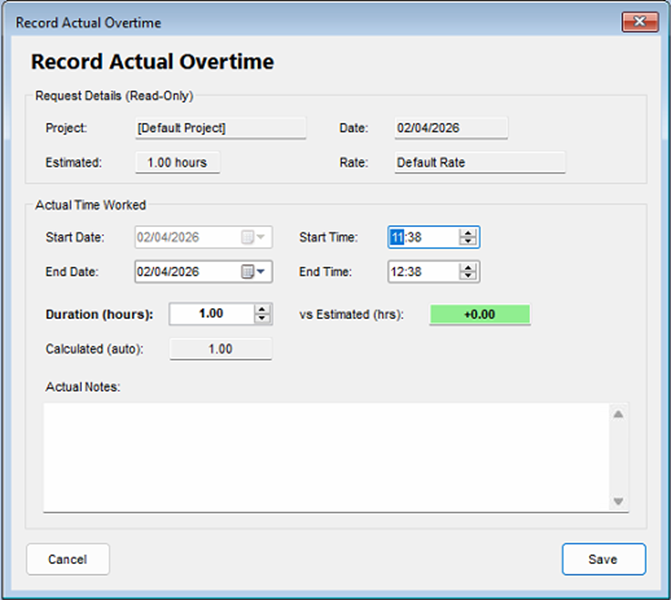
Once your request has been approved, you can update the request with the actual overtime worked.

Click ‘Record Actual Time’

<span style="mso-no-proof: yes;"> </span>

[![image.png](https://kb.findesolutions.com/uploads/images/gallery/2026-04/scaled-1680-/8NnJEOGJiCZTDtPy-image.png)](https://kb.findesolutions.com/uploads/images/gallery/2026-04/8NnJEOGJiCZTDtPy-image.png)

Update your timings.

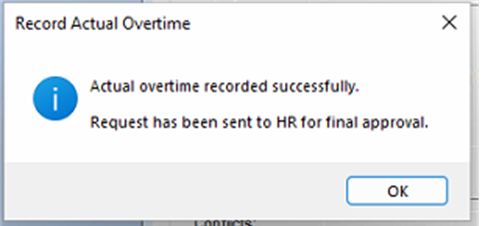
<span style="font-family: Symbol; mso-fareast-font-family: Symbol; mso-bidi-font-family: Symbol;"><span style="mso-list: Ignore;">·<span style="font: 7.0pt 'Times New Roman';"> </span></span></span>Click ‘Save’

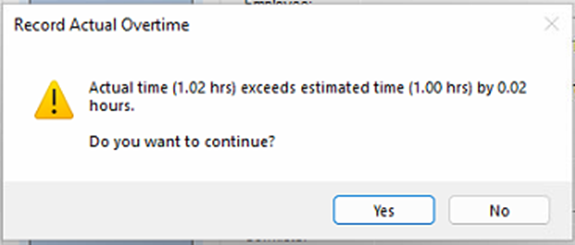
If your timings exceed your initial request, you will be warned, please check your timings or proceed.

<span style="mso-no-proof: yes;"> </span>

[![image.png](https://kb.findesolutions.com/uploads/images/gallery/2026-04/scaled-1680-/u1eZZhI3DCY4JDtS-image.png)](https://kb.findesolutions.com/uploads/images/gallery/2026-04/u1eZZhI3DCY4JDtS-image.png)

<span style="mso-no-proof: yes;"> </span>

[![image.png](https://kb.findesolutions.com/uploads/images/gallery/2026-04/scaled-1680-/gTTXV0A147AhduuO-image.png)](https://kb.findesolutions.com/uploads/images/gallery/2026-04/gTTXV0A147AhduuO-image.png)

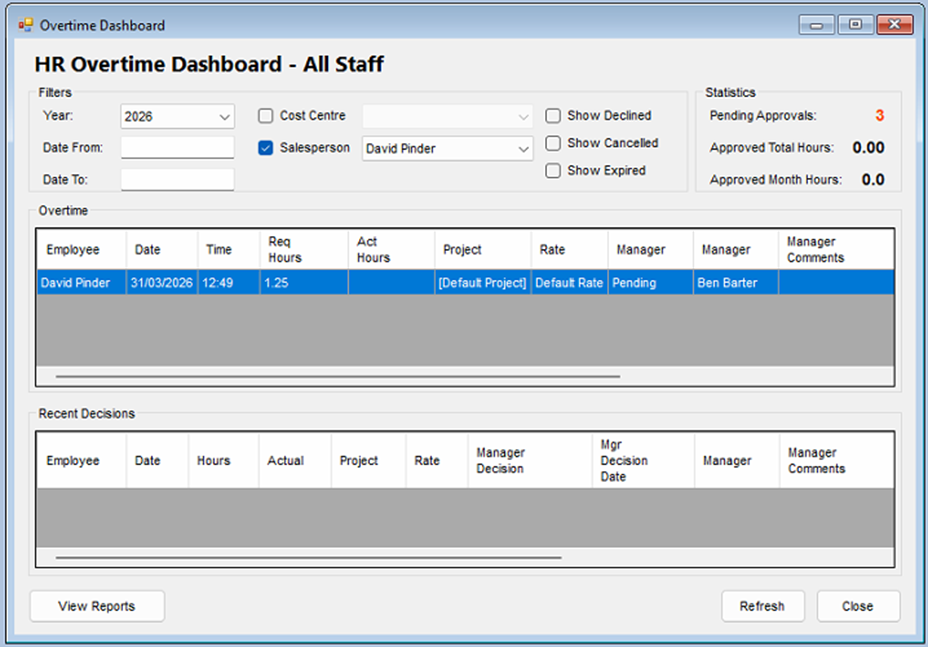
### <a name="_Toc226642041"></a>Overtime Dashboard / overview

HR &gt; Overtime &gt; Overtime Dashboard/Overview

**Note The view presented here will change depend in your job Roll.**

<span style="font-family: Wingdings; mso-fareast-font-family: Wingdings; mso-bidi-font-family: Wingdings;"><span style="mso-list: Ignore;">Ø<span style="font: 7.0pt 'Times New Roman';"> </span></span></span>Staff – will only see their overview.

<span style="font-family: Wingdings; mso-fareast-font-family: Wingdings; mso-bidi-font-family: Wingdings;"><span style="mso-list: Ignore;">Ø<span style="font: 7.0pt 'Times New Roman';"> </span></span></span>Managers – will see entries for all staff that they manage.

<span style="font-family: Wingdings; mso-fareast-font-family: Wingdings; mso-bidi-font-family: Wingdings;"><span style="mso-list: Ignore;">Ø<span style="font: 7.0pt 'Times New Roman';"> </span></span></span>HR – will see all entries.

[![image.png](https://kb.findesolutions.com/uploads/images/gallery/2026-04/scaled-1680-/ELhKSwxp2CLad6pw-image.png)](https://kb.findesolutions.com/uploads/images/gallery/2026-04/ELhKSwxp2CLad6pw-image.png)

<span style="mso-no-proof: yes;"> </span>

This Will give you an overview of your overtime booked, and any recent decisions.

The information can be filtered by

<span style="font-family: Wingdings; mso-fareast-font-family: Wingdings; mso-bidi-font-family: Wingdings;"><span style="mso-list: Ignore;">§<span style="font: 7.0pt 'Times New Roman';"> </span></span></span>Date Range

<span style="font-family: Wingdings; mso-fareast-font-family: Wingdings; mso-bidi-font-family: Wingdings;"><span style="mso-list: Ignore;">§<span style="font: 7.0pt 'Times New Roman';"> </span></span></span>Cost Centre

<span style="font-family: Wingdings; mso-fareast-font-family: Wingdings; mso-bidi-font-family: Wingdings;"><span style="mso-list: Ignore;">§<span style="font: 7.0pt 'Times New Roman';"> </span></span></span>Salesperson

And declined, cancelled and expired can be shown or hidden.

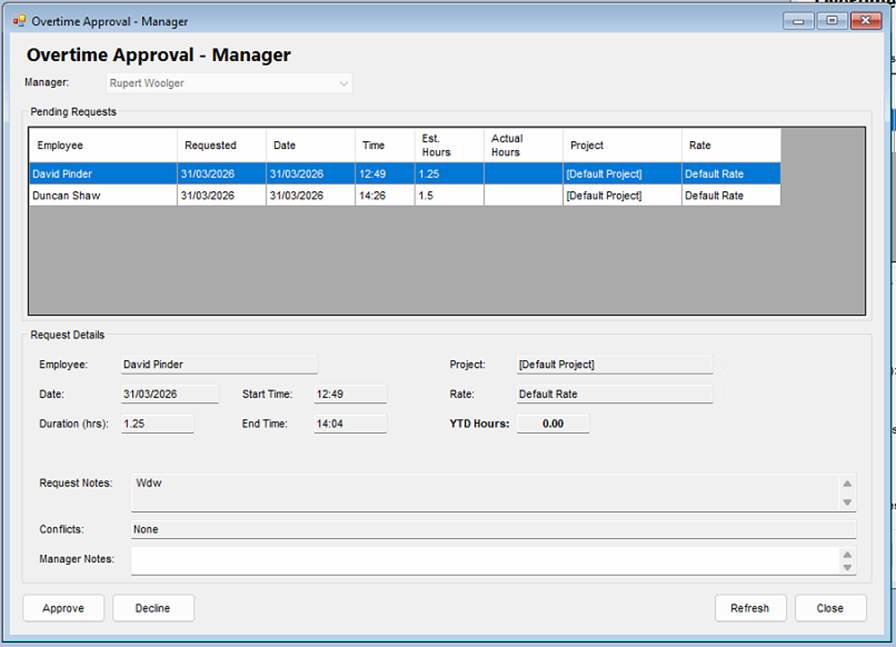
### <a name="_Toc226642042"></a>Managers overtime approval Queue

HR &gt;Holidays &gt; Managers Approval Queue

[![image.png](https://kb.findesolutions.com/uploads/images/gallery/2026-04/scaled-1680-/RlrAUZ76Qec6X2DD-image.png)](https://kb.findesolutions.com/uploads/images/gallery/2026-04/RlrAUZ76Qec6X2DD-image.png)

<span style="mso-no-proof: yes;"> </span>

You will see the pending requests for all the staff you manage.

Select one of the requests from this list.

The request details will be shown along with any notes and the remaining entitlement days.

### <a name="_Toc226642043"></a>Request Approval

<span style="font-family: Symbol; mso-fareast-font-family: Symbol; mso-bidi-font-family: Symbol;"><span style="mso-list: Ignore;">·<span style="font: 7.0pt 'Times New Roman';"> </span></span></span>Highlight the request you want to approve or decline.

the request details will update to show the leave type, requested dates, total days and the days the staff member has left after this approval.

<span style="font-family: Symbol; mso-fareast-font-family: Symbol; mso-bidi-font-family: Symbol;"><span style="mso-list: Ignore;">·<span style="font: 7.0pt 'Times New Roman';"> </span></span></span>Click Approve or Decline

## <a name="_Toc226642044"></a>HR Approval

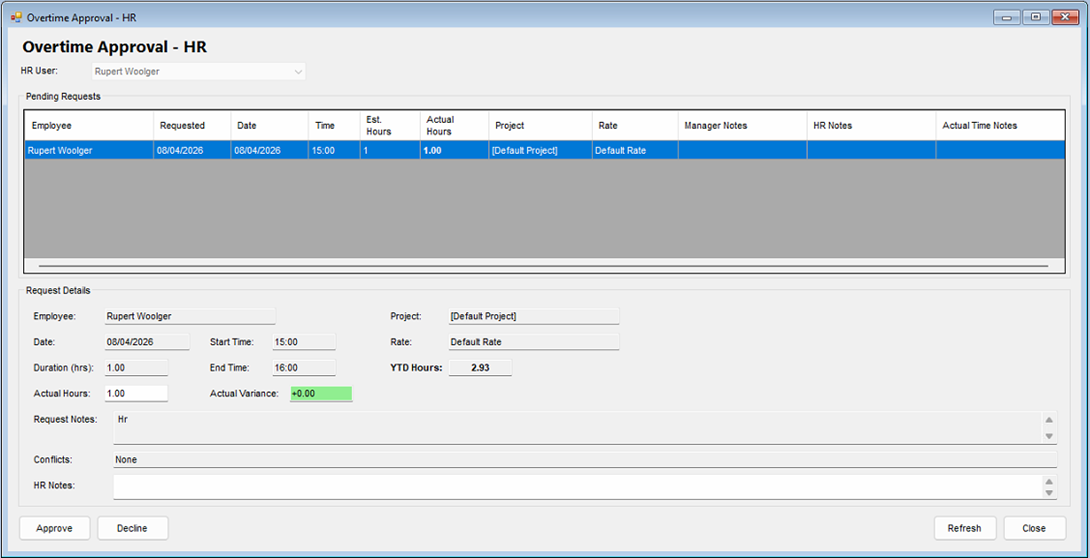
HR &gt;Overtime &gt; HR Approval Queue

[![image.png](https://kb.findesolutions.com/uploads/images/gallery/2026-04/scaled-1680-/MUIU6kN7aGFnAXva-image.png)](https://kb.findesolutions.com/uploads/images/gallery/2026-04/MUIU6kN7aGFnAXva-image.png)

You will see the pending requests for all the staff.

<span style="mso-no-proof: yes;"> </span>

- Select one of the requests from this list.

The request details will be shown along with any notes and the remaining entitlement days.

### <a name="_Toc226642045"></a>Request Approval

<span style="font-family: Symbol; mso-fareast-font-family: Symbol; mso-bidi-font-family: Symbol;"><span style="mso-list: Ignore;">·<span style="font: 7.0pt 'Times New Roman';"> </span></span></span>Highlight the request you want to approve or decline.

the request details will update to show the Project, rate, start time, end time, actual hours and the Variance from the original request

<span style="font-family: Symbol; mso-fareast-font-family: Symbol; mso-bidi-font-family: Symbol;"><span style="mso-list: Ignore;">·<span style="font: 7.0pt 'Times New Roman';"> </span></span></span>Click Approve or Decline

Select one of the requests from this list.

## Reporting

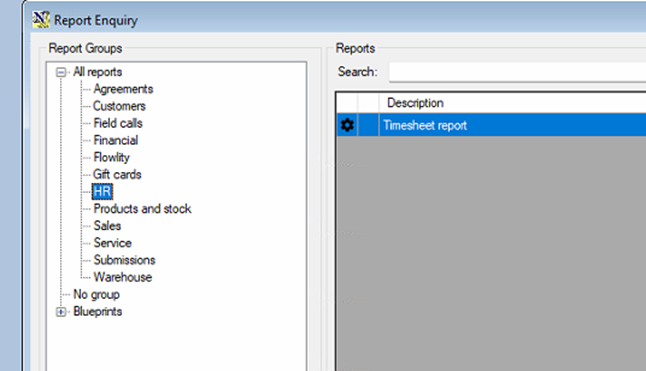
You will find all reports for the HR Module in Under.

Reports &gt; Additional Reports

[![image.png](https://kb.findesolutions.com/uploads/images/gallery/2026-04/scaled-1680-/tj96nNlVPnnJByh8-image.png)](https://kb.findesolutions.com/uploads/images/gallery/2026-04/tj96nNlVPnnJByh8-image.png)

Click on HR on the reports tree.

[![image.png](https://kb.findesolutions.com/uploads/images/gallery/2026-04/scaled-1680-/9YD0pkXEg0VaLZJp-image.png)](https://kb.findesolutions.com/uploads/images/gallery/2026-04/9YD0pkXEg0VaLZJp-image.png)
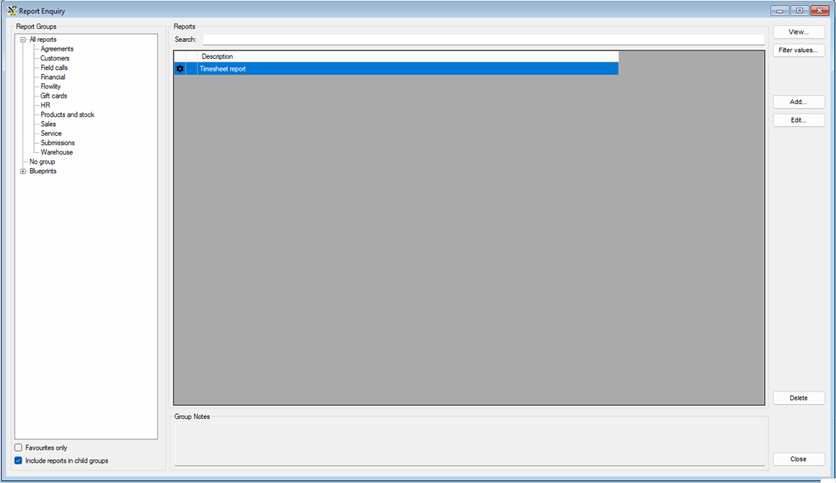
<span style="mso-no-proof: yes;"> </span>