Please be aware that NCompass Anywhere inherits the permissions set against a User in NCompass Desktop. So changing any permissions so the User can run Reports in Anywhere, means they will able to run the same reports in Desktop NCompass, as the two systems are linked.
If you do not currently have the relevant permissions to change these settings against a User, pause here, and discuss with your manager to confirm if access can be granted to this section or not.Please Note: Our Support team are happy to assist you in configuring these permissions if help is required, but will only do so if they have be granted permission by a senior member of staff at your company.
To edit the permissions of a User, first select the User in question and press Edit. Using the navigation arrows, browse to the 'NCompass Desktop' tab. From here, you can control if a User has access to run Reports or not via the Reports tickbox highlighted below [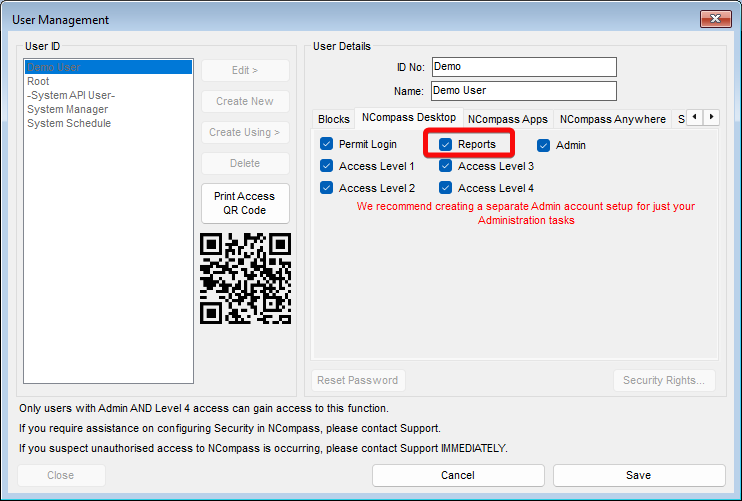](https://kb.findesolutions.com/uploads/images/gallery/2026-04/re4qLpMIsHGKSWzD-image.png) If you require a member of Staff to be able to run any Reports configured under Reports > Additional Reports (which are the reports that can be run on NCompass Anywhere) but not be able to run any other type of report, then it is possible to do this via the Security Rights button in the bottom left hand corner of this screen.Please contact Support if you require assistance setting this up
If you then use the Navigation Buttons to browse to the NCompass Anywhere tab, you can control if the user can Login to NCompass Anywhere or not via the Permit Login Button [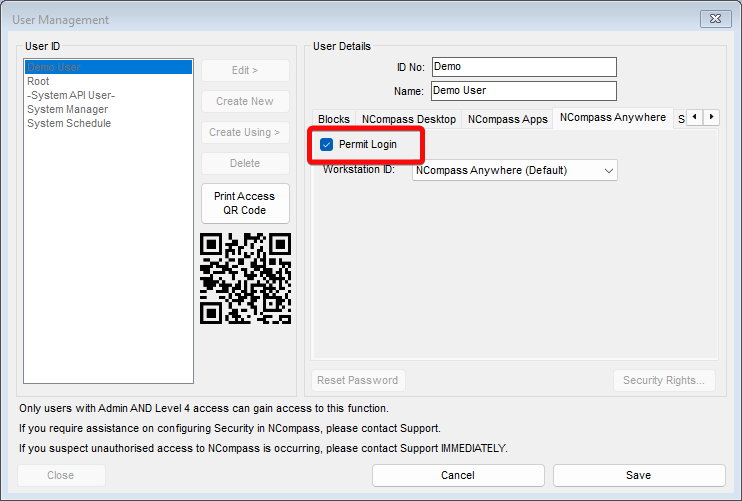](https://kb.findesolutions.com/uploads/images/gallery/2026-04/GhzzXyhb7rOBwnxW-image.png) By Default, all users are permitted to login to Anywhere. So if you only want select staff to be able to login to the application, then you will need to change this setting against each user.